Lessons Learned Template: Run Retrospectives That Drive Change
Lessons learned template with facilitation guide, retrospective format comparison, and real examples for project, incident, and product launch reviews.
Most lessons learned sessions produce a document that no one reads and nothing changes. The problem is not the framework -- it is that teams treat lessons learned as a compliance exercise rather than an operational input. A lessons learned template only works when it connects observations to root causes, root causes to action items, and action items to named owners with deadlines.
After facilitating lessons learned sessions across 60+ consulting engagements, post-merger integrations, and technology programs, we have tracked which session formats produce measurable process changes and which generate well-intentioned lists that expire in a shared drive. The difference comes down to three factors: timing (within two weeks of the event), structure (root causes, not just observations), and accountability (every action item has an owner).
This guide provides a complete lessons learned template, compares four retrospective formats, walks through real examples, and covers the facilitation techniques that separate productive sessions from blame-fests. For the broader strategic toolkit, see our Strategic Frameworks Guide.
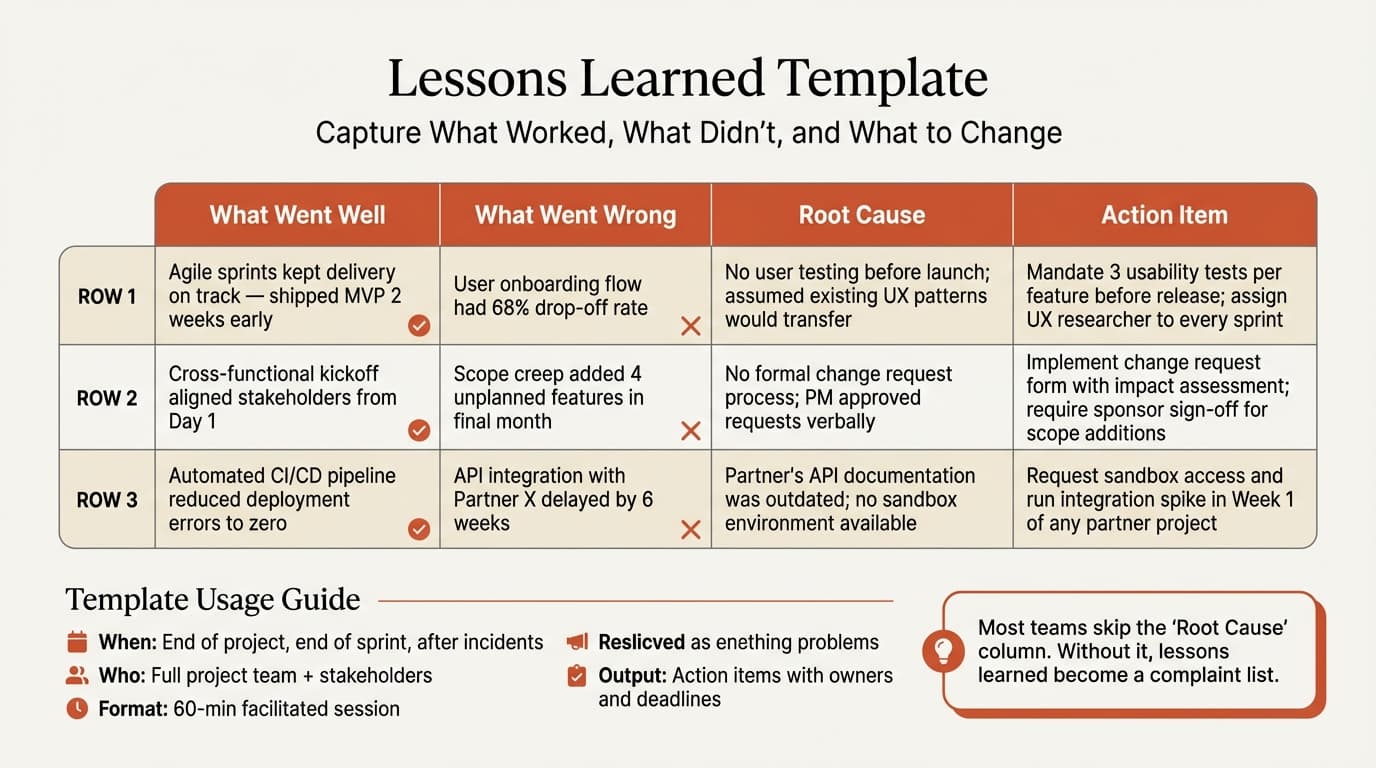
What Is a Lessons Learned Template?
A lessons learned template is a structured document for capturing what happened during a project, initiative, or incident -- what worked, what did not, why, and what the team will do differently next time. The terms vary by context: agile teams call them retrospectives, engineering teams use post-mortems, and the military calls them after-action reviews. The underlying structure is the same.
The concept of structured after-action reviews was pioneered by the U.S. Army in the 1970s and has since been adopted across consulting and corporate project management. An effective template has five core sections:
| Section | Purpose | Common Failure |
|---|---|---|
| What went well | Identify successes to replicate | Listed but never institutionalized |
| What did not go well | Surface problems honestly | Described as symptoms, not root causes |
| Root cause analysis | Determine why problems occurred | Skipped entirely or done superficially |
| Action items | Define specific corrective steps | Vague commitments with no owner |
| Context fields | Project name, date, participants, scope | Missing, making the document useless months later |
The root cause section is what separates a useful lessons learned template from a feedback form. "Communication was poor" is an observation. "The project lacked a weekly status update cadence, so stakeholders received information only when problems escalated" is a root cause that leads to a specific fix. For a deeper dive on root cause techniques, see our Root Cause Analysis Examples.
Lessons Learned Template: The Complete Structure
Here is the template structure we use across engagements. Each section has a specific purpose and format.
Header fields:
- Project / initiative name
- Date of review session
- Facilitator name
- Participants (names and roles)
- Project phase or milestone reviewed
- Time period covered
Section 1: What Went Well
List 3-7 specific successes. For each, note why it worked and whether it should become a standard practice.
| Success | Why It Worked | Recommendation |
|---|---|---|
| Weekly stakeholder demos reduced late-stage surprises | Forced synthesis at regular intervals | Adopt as standard for all projects over 6 weeks |
| Cross-functional war room during launch week | Eliminated handoff delays between teams | Use for any launch with 3+ department dependencies |
Section 2: What Did Not Go Well
List problems without attribution to individuals. Describe the impact in measurable terms where possible.
| Problem | Impact | Contributing Factors |
|---|---|---|
| Requirements changed three times during build phase | 4-week schedule delay, 20% budget overrun | No formal change control process; sponsor added scope in ad-hoc meetings |
| Data migration quality issues discovered in UAT | 2-week testing extension; manual cleanup for 12,000 records | No data validation checkpoint between extraction and load |
Section 3: Root Causes and Action Items
Each problem gets a root cause analysis and at least one action item with an owner and deadline.
| Problem | Root Cause | Action Item | Owner | Deadline |
|---|---|---|---|---|
| Requirements churn | No change control gate; ad-hoc scope additions bypassed project governance | Implement formal change request process with impact assessment template | PMO Lead | Before next project kickoff |
| Data migration defects | Validation happened only at UAT; no intermediate quality checkpoint | Add data reconciliation step after extraction and before load in migration playbook | Data Lead | 30 days |
Section 4: Summary and Follow-Up
- Top 3 things to repeat
- Top 3 things to change
- Follow-up review date (30-60 days to verify action items are complete)
Lessons Learned Examples by Context
Example 1: Project Completion Review
Context: A financial services firm completed a 6-month CRM implementation. The system went live on time but user adoption lagged at 40% after 30 days.
What went well: Technical migration executed flawlessly; zero data loss. Executive sponsorship was strong throughout.
What did not go well: Training was compressed into the final two weeks. Power users were identified too late to serve as adoption champions. No post-launch support plan beyond IT helpdesk.
Root cause: Training was treated as a project deliverable (check the box) rather than a change management workstream with its own timeline and success metrics.
Action item: For future implementations, begin training development at the start of the build phase, recruit power users during discovery, and define adoption targets (not just go-live) as project success criteria. Owner: Change Management Lead. Deadline: Next project charter.
Example 2: Incident Post-Mortem
Context: An e-commerce platform experienced 4 hours of checkout downtime during a peak sales period. Revenue impact estimated at $180,000.
What went well: On-call engineer was paged within 3 minutes. Communication to customers was transparent and timely.
What did not go well: Root cause (database connection pool exhaustion) had been flagged as a risk in a prior capacity review but was deprioritized. Rollback took 90 minutes because the deployment lacked an automated rollback procedure.
Root cause: No process for escalating known technical risks from engineering reviews to sprint prioritization. The risk was documented but never entered the backlog with appropriate severity.
Action items: (1) Create automated rollback for all production deployments. Owner: Platform Lead. Deadline: 2 weeks. (2) Establish a process for capacity review findings to generate backlog items with SLA for resolution. Owner: Engineering Manager. Deadline: 30 days.
Example 3: Product Launch Review
Context: A B2B SaaS company launched a new analytics module. Launch hit the target date, but first-month activation was 25% below forecast.
What went well: Engineering delivered all features on schedule. Marketing generated strong awareness metrics: 3x normal blog traffic, 2x webinar registrations.
What did not go well: Sales team was not briefed on the feature until launch week. Documentation was incomplete at launch. The pricing page did not reflect the new module until day 3.
Root cause: No cross-functional launch checklist. Each department executed its own tasks without a shared readiness definition. Sales enablement was assumed to happen but was not assigned in the project plan.
Action item: Create a launch readiness checklist with sign-off gates for product, engineering, marketing, sales, support, and documentation. Assign a launch coordinator role for all future releases. Owner: VP Product. Deadline: Before next launch.
Example 4: Quarterly Business Review
Context: A consulting firm's quarterly review of project delivery across 12 active engagements.
What went well: Client satisfaction scores averaged 4.3/5.0, up from 3.9 the prior quarter. Two engagements expanded scope based on interim deliverable quality.
What did not go well: Three projects exceeded budgeted hours by more than 15%. Staff utilization variance was high -- some teams at 120% while others at 70%.
Root cause: Resource allocation was managed per-project without portfolio-level visibility. Project leads competed for the same senior analysts without a central staffing function.
Action item: Implement weekly portfolio-level staffing review with visibility into utilization across all active engagements. Owner: Operations Director. Deadline: Next quarter start.
Continue reading: After Action Review Template · Timeline Slides in PowerPoint · Competitive Landscape Slide
Use consulting-grade layouts in PowerPoint
Start from structured business slides and customize them in your own deck. 14-day free trial. No credit card required.
Retrospective Formats Compared
Different formats suit different contexts. Here is how the four most common approaches compare.
| Format | Structure | Best For | Limitation |
|---|---|---|---|
| Traditional Lessons Learned | What went well, what didn't, root causes, action items | Project completions, formal reviews, executive audiences | Can feel heavy for small teams or short sprints |
| Start-Stop-Continue | What to start doing, stop doing, continue doing | Sprint retros, team process improvements | No root cause analysis; stays at the symptom level |
| 4Ls (Liked, Learned, Lacked, Longed For) | Four emotional/practical categories | Team morale check-ins, creative teams | Less structured for action planning |
| Mad-Sad-Glad | Emotional framing of experiences | Team health checks, culture assessments | Not suited for operational process improvement |
Our recommendation: Use traditional lessons learned for anything that requires action items and accountability -- project completions, incidents, launches. Use Start-Stop-Continue for lightweight sprint retrospectives where the team already shares context. Use 4Ls or Mad-Sad-Glad only when the primary goal is surfacing team sentiment rather than driving process change.
For projects that span multiple workstreams, combining lessons learned with a RACI matrix helps connect problems to specific accountability gaps. If the root cause of a failure is "nobody owned this," the RACI makes that gap visible.
How to Facilitate an Effective Lessons Learned Session
Structure and facilitation quality determine whether a session produces change or just fills a template.
Before the session:
- Schedule within 1-2 weeks of the event. As PMI's knowledge management guidance stresses, memory degrades quickly, and participants start constructing narratives rather than reporting facts.
- Send the template in advance so participants can reflect. Cold sessions produce surface-level feedback.
- Choose a neutral facilitator -- someone not directly accountable for the project outcomes. A facilitator with skin in the game will unconsciously steer the conversation away from uncomfortable findings.
During the session:
- Set the ground rule: "We discuss systems and processes, not individuals." State this explicitly at the start. One blame-oriented comment can shut down honest participation for the rest of the session.
- Start with what went well. This is not just a warm-up -- it identifies practices worth standardizing. Teams that skip this section lose institutional knowledge about what works.
- Use "5 Whys" for root causes. When someone says "communication was poor," ask why. "Because there was no regular update cadence." Why? "Because the project plan didn't include a communication workstream." Now you have a fixable root cause.
- Convert every observation to an action item. If a problem is worth discussing, it is worth assigning. An observation without an action item is a complaint, not a lesson.
- Time-box the session. 60-90 minutes for most projects. Longer sessions produce diminishing returns and participant fatigue.
After the session:
- Distribute the completed template within 48 hours. Momentum dies when documentation lags.
- Schedule a 30-day follow-up to review action item completion. This is the step most teams skip, and it is the reason most lessons learned documents have no impact.
- Store lessons in a searchable repository, not buried in project folders. New project teams should be able to find relevant lessons from prior engagements.
For structuring the follow-up actions from a lessons learned session into a clear plan, see our Next Steps Template.
Common Lessons Learned Mistakes
1. Running sessions too late. A retrospective held two months after project completion captures reconstructed memories, not facts. Details like "the vendor was three days late on the API delivery, which compressed our testing by a week" become "the timeline was tight." The specific, actionable detail is lost.
2. Documenting symptoms instead of root causes. "Communication was poor" appears in nearly every lessons learned document we have reviewed. It is a symptom. The root cause might be: no status meeting cadence, unclear escalation paths, stakeholders excluded from distribution lists, or a RACI matrix that was never built. Without root cause analysis, the same problems recur.
3. No action items or unassigned action items. A lessons learned session that ends with "we should communicate better next time" has accomplished nothing. Every identified problem needs a specific action, a named owner, and a deadline. "Implement weekly 15-minute standup for all cross-functional projects" assigned to the PMO Lead with a 30-day deadline is a lesson learned. "Improve communication" is a wish.
4. Blame culture. When participants fear that honest feedback will result in consequences, they self-censor. The session produces a sanitized document where everything "went mostly well" and the few issues were caused by "external factors." The facilitator must actively redirect blame-oriented language toward systemic analysis. "The deployment failed because [person] didn't test it" becomes "the deployment process did not include a mandatory pre-deployment test gate."
5. No follow-up on action items. This is the most common failure. Teams invest 90 minutes in a thorough session, produce a detailed document, and never revisit it. Without a 30-day follow-up review, action items have a completion rate below 20% in our experience. Schedule the follow-up before the session ends.
Presenting Lessons Learned to Stakeholders
Not every audience needs the full template. Match the format to the audience.
| Audience | Format | Content Focus |
|---|---|---|
| Project team | Full template | All sections with detailed root causes and action items |
| Steering committee | One-page summary | Top 3 successes, top 3 issues, action items with status |
| Executive sponsor | Slide deck (1-2 slides) | Key metrics, critical lessons, decisions needed |
| Future project teams | Searchable knowledge base entry | Context, root causes, and recommended practices |
For executive-level presentation of lessons learned, Deckary's AI slide builder can generate structured summary slides with action item tables directly in PowerPoint, following consulting slide standards.
Key Takeaways
- A lessons learned template works when every observation connects to a root cause and every root cause connects to an action item with an owner and deadline.
- Run sessions within 1-2 weeks of the event. Memory fades and narratives replace facts quickly.
- Use a neutral facilitator and enforce blameless discussion. One blame-oriented comment can shut down honest feedback for the entire session.
- Traditional lessons learned format is best for projects and incidents that need accountability. Start-Stop-Continue works for lightweight sprint retrospectives.
- The 30-day follow-up review is the single most impactful practice -- without it, action items have a completion rate below 20%.
- Store lessons in a searchable repository so future teams can learn from prior engagements instead of repeating the same mistakes.
For structuring your next steps after a lessons learned session, use our Next Steps Template. For the complete framework toolkit, explore our Strategic Frameworks Guide, Project Plan Examples, and RACI Matrix Examples.
Use consulting-grade layouts in PowerPoint
Start from structured business slides and customize them in your own deck. 14-day free trial. No credit card required.