Keynote vs PowerPoint: Which One Should You Choose?
Keynote vs PowerPoint compared across design, animations, collaboration, compatibility, and pricing. Clear recommendations for Mac users and business professionals.
Keynote produces the most visually polished presentations of any mainstream tool. Its animations are smoother, its templates are cleaner, and the interface is simpler than PowerPoint. For Mac users who present conference talks or create personal projects, Keynote's core features remain genuinely excellent — and free.
The problem is that Keynote exists in Apple's ecosystem while most business presentations live in PowerPoint's world. After building presentations across both tools for 150+ client engagements and internal decks — including strategy presentations, board materials, and pitch decks — we found that Keynote's design advantages get erased by compatibility friction the moment you need to share a .pptx file or collaborate with Windows users. As of January 2026, Apple's shift to a freemium model with Apple Creator Studio means Keynote's cost advantage has narrowed for users who need premium features.
This guide compares Keynote and PowerPoint across design, animations, collaboration, compatibility, add-ins, and pricing. We end with clear recommendations so you know which tool fits your workflow without creating extra conversion work.
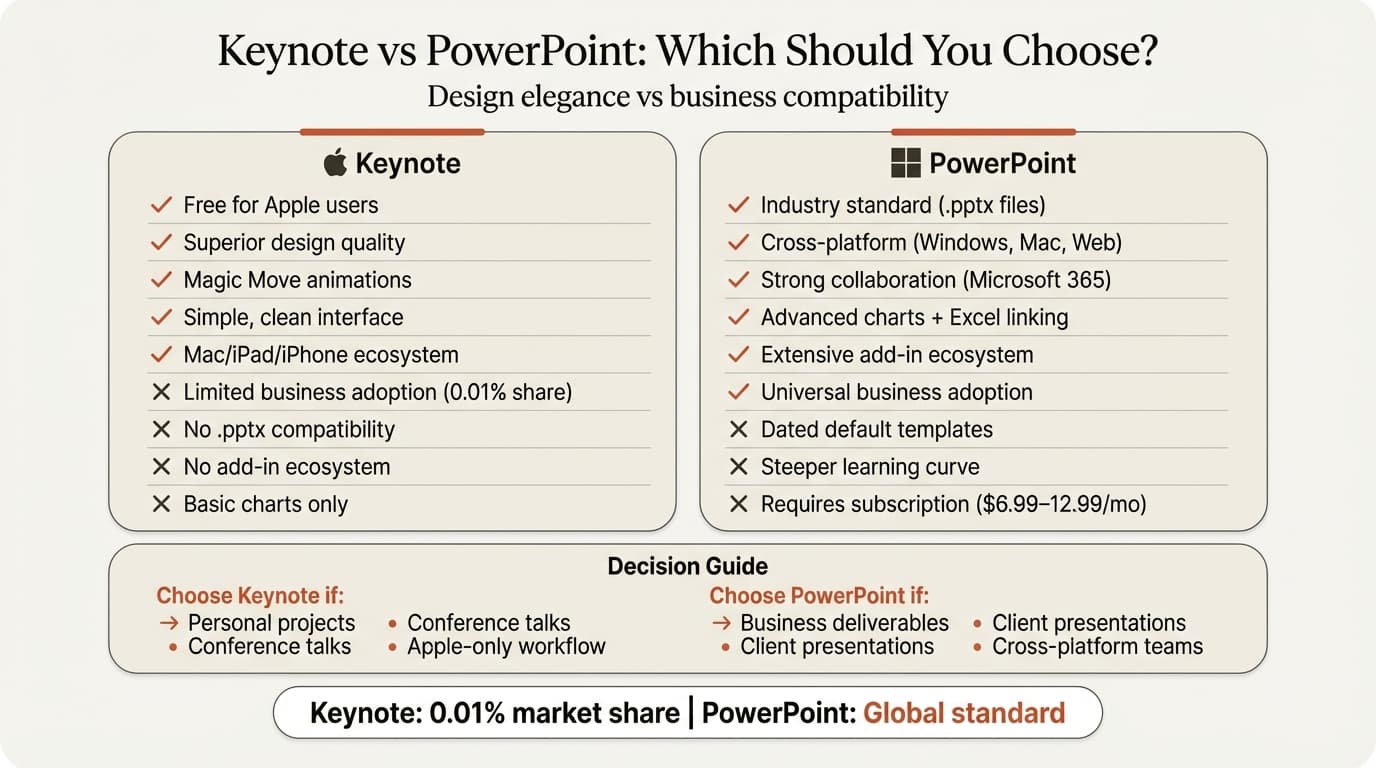
Keynote vs PowerPoint: Feature Comparison Table
This is the core comparison. Save this table for reference when choosing between the two.
| Feature | Keynote | PowerPoint | Winner |
|---|---|---|---|
| Price (personal) | Free (basic), $12.99/mo (premium) | $8.33/mo ($99.99/year M365) | Tie |
| Platform support | Mac, iPad, iPhone, web (iCloud) | Windows, Mac, web, mobile | PowerPoint |
| Design quality | Superior (polished templates, clean) | Good (dated templates without customization) | Keynote |
| Animations | Smoother (Magic Move is unmatched) | More types (Morph, 3D, motion paths) | Tie |
| Ease of use | Simpler interface, gentler learning curve | Steeper learning curve, dense ribbon UI | Keynote |
| Collaboration | iCloud sharing, limited real-time editing | Strong (Microsoft 365 co-authoring, Teams) | PowerPoint |
| File format | .key (exports .pptx with formatting loss) | Native .pptx | PowerPoint |
| Compatibility | Apple ecosystem only | Universal | PowerPoint |
| Chart types | Basic via Numbers | 20+ native types, Excel linking | PowerPoint |
| Add-in ecosystem | None | Extensive (charts, AI, productivity) | PowerPoint |
| Offline editing | Full offline support | Full offline support | Tie |
| Template library | Smaller, higher quality | Larger, more variety | Tie |
| Business adoption | Low (0.01% market share) | Dominant (global standard) | PowerPoint |
Score: PowerPoint 7, Keynote 2, Tie 4. Keynote wins on design elegance. PowerPoint wins on compatibility, collaboration, and business practicality. The question is whether design quality outweighs the compatibility tax.
Design and Aesthetics: Where Keynote Clearly Wins
Keynote's design quality is noticeably better than PowerPoint's defaults. According to industry comparisons, "when it comes to design and aesthetics, Keynote takes the lead. Apple is known for clean, polished visuals, and Keynote reflects that."
Even basic Keynote templates look presentation-ready. Typography is cleaner, spacing is more deliberate, and color schemes are more sophisticated. PowerPoint's default templates, by contrast, often look dated without customization. You can build beautiful presentations in PowerPoint — it just requires more manual formatting work.
The practical impact: For conference presentations, TED-style talks, or portfolio work where visual polish matters and you control the entire workflow, Keynote produces better-looking results faster. For client deliverables that will be edited by others or exported to PowerPoint format, the design advantage disappears during conversion.
Animations: Different Strengths for Different Needs
Keynote and PowerPoint take fundamentally different approaches to animations.
Keynote's animation philosophy: Smooth, elegant, cinematic. The signature feature is Magic Move, which automatically animates objects between slides. Duplicate a slide, move objects to new positions, and Magic Move creates seamless transitions. According to Apple's documentation, "Magic Move offers different animation options: By Object, By Word, and By Character" with acceleration controls for precise timing.
PowerPoint's animation philosophy: Variety and control. You get more animation types (fly-in, fade-out, zoom, bounce), Morph transitions that rival Magic Move, 3D model animations, and motion paths for frame-by-frame control. Comparisons note that "PowerPoint offers a broader range of customizable effects like Morph and Zoom, making it better suited for advanced, dynamic presentations."
Winner: Tie, but for different reasons. Keynote's animations look more polished with less work. PowerPoint's animations offer deeper customization and more options. If you want elegant results quickly, choose Keynote. If you need precise control over complex animations, choose PowerPoint.
Ease of Use: Keynote Has the Gentler Learning Curve
Keynote's interface is simpler. As reviews consistently note, "Keynote has a really smooth and slick user interface. For beginners, it's arguably better than PowerPoint, with a gentler learning curve and less confusing UI."
PowerPoint's ribbon menu system organizes hundreds of features across multiple tabs. This gives you more control but creates visual density that can overwhelm new users. Finding the specific option you need often requires hunting through menus.
The trade-off: Keynote's simplicity is both its strength and limitation. The clean interface makes common tasks easy, but you hit feature ceilings faster. PowerPoint's complexity means more time upfront learning where features live, but deeper capabilities for advanced needs.
For occasional presenters or Mac users building simple decks, Keynote's ease of use is a genuine advantage. For professionals who create 10+ presentations per month, PowerPoint's learning curve pays dividends through features Keynote simply cannot match.
Collaboration: PowerPoint Wins for Teams
Microsoft 365 provides stronger collaboration tools with real-time editing, commenting, and cloud syncing across devices. Multiple users can edit PowerPoint files simultaneously through OneDrive or SharePoint, with co-authoring that handles conflicts and shows live cursors.
Keynote allows sharing via iCloud, but collaborative features are more limited compared to Microsoft's platform. You can share Keynote presentations for collaboration, but the experience is less seamless — particularly when collaborators use different devices or platforms.
For business teams: PowerPoint's collaboration advantage is significant. If your workflow involves cross-functional editing, version control across departments, or integration with Teams and Outlook, PowerPoint fits organizational infrastructure better.
For individual creators: Keynote's collaboration limitations matter less. If you primarily create presentations solo and only share finished files, iCloud sharing is sufficient.
Continue reading: PowerPoint Charts · PowerPoint Design Ideas · Case Study Template PowerPoint
Create an editable presentation in your browser
Turn a prompt or source files into slides you can edit and export to PowerPoint. 10 free AI prompts. No credit card required.
File Compatibility: PowerPoint's Universal Format Matters
The business world runs on .pptx files. Clients, partners, and executives expect PowerPoint format. Keynote can export to .pptx, but conversion introduces formatting issues:
- Custom fonts revert to system defaults
- Animations simplify or disappear
- Precise object positioning shifts
- Chart formatting changes
- Embedded media may not transfer
According to compatibility research, "the integration sputters when you try using Keynote slide decks in PowerPoint." If your final deliverable must be a .pptx file — and in most corporate contexts it must — building in PowerPoint avoids the conversion tax entirely.
The reality for business professionals: Consulting firms, investment banks, and Fortune 500 companies standardize on PowerPoint. Strategy presentations, board decks, and client deliverables need to be .pptx format. You can draft in Keynote, but you will spend time fixing formatting issues after export. This cleanup work erases the time savings from Keynote's simpler interface.
Charts and Data Visualization: PowerPoint's Biggest Advantage
PowerPoint supports over 20 native chart types with full formatting control, plus Excel linking that automatically updates charts when data changes. Keynote offers basic charting through Numbers integration — bar, line, pie, and a handful of others — but advanced chart types are unavailable.
More importantly, PowerPoint's add-in ecosystem unlocks chart types neither tool offers natively. Consulting-grade visualizations like waterfall charts, Mekko charts, and Gantt charts require add-ins like Deckary. Keynote has no equivalent ecosystem for advanced charting.
| Chart Capability | Keynote | PowerPoint |
|---|---|---|
| Basic bar, line, pie | Yes (via Numbers) | Yes (native + Excel) |
| Waterfall charts | No | Yes (native + add-ins) |
| Mekko / Marimekko | No | Add-ins only |
| Gantt charts | No | Add-ins only |
| Combo charts | No | Yes |
| Excel/Numbers auto-update | Limited Numbers link | Full Excel linking |
| Formatting control | Basic | Advanced |
For data-heavy presentations — financial analysis, strategy consulting, investor updates — PowerPoint is the clear choice. The combination of native chart depth plus add-in extensibility means you can build any visualization a client or board member expects.
Add-In Ecosystem: PowerPoint's Extensibility Advantage
PowerPoint's add-in marketplace is one of its strongest differentiators. Hundreds of add-ins extend PowerPoint's native capabilities in ways Keynote cannot replicate:
- Consulting charts: Tools like Deckary add waterfall charts, Mekko charts, and Gantt charts with Excel linking
- AI generation: Purpose-built AI tools that generate consulting-quality slides inside PowerPoint
- Productivity: Keyboard shortcuts for alignment and distribution
- Content libraries: Icon, image, and slide template libraries accessible from the ribbon
Keynote has no add-in ecosystem. The Apple app is self-contained with no third-party extensibility.
This matters most for professionals who build presentations as a core part of their job. Consultants, investment bankers, and corporate strategists who create 10+ decks per month benefit from PowerPoint's add-in ecosystem. For occasional presenters, native tools in either platform are likely sufficient.
Pricing: Keynote's Free Tier vs PowerPoint's Subscription
Personal use:
| Plan | Annual Cost | Includes |
|---|---|---|
| Keynote (free tier) | $0 | Core features: create, edit, collaborate on Mac, iPad, iPhone, iCloud web |
| Apple Creator Studio | $129/year ($12.99/month) | Premium: AI features, exclusive themes, Content Hub |
| Microsoft 365 Personal | $99.99/year | PowerPoint + Word, Excel, Outlook, 1 TB OneDrive |
| Microsoft 365 Family | $129.99/year | Same as Personal, up to 6 users |
As of January 2026, Keynote shifted to a freemium model. Basic presentation creation, editing, and collaboration remain free. Premium features — AI-powered capabilities, exclusive themes, and Content Hub access — require an Apple Creator Studio subscription at $12.99/month or $129/year.
For users who only need core features, Keynote's free tier still offers better value than PowerPoint's subscription. For users who want premium features, Apple Creator Studio and Microsoft 365 Personal are now identically priced at $129/year, though Microsoft 365 includes the full Office suite while Creator Studio covers only iWork apps.
Business use:
| Plan | Monthly Cost (per user) | Includes |
|---|---|---|
| Keynote (free tier) | $0 | Core features on Apple devices |
| Apple Creator Studio | $12.99 | Premium features (per user) |
| Microsoft 365 Business Basic | $6 | Web-only Office apps, Teams, 1 TB OneDrive |
| Microsoft 365 Business Standard | $12.50 | Desktop + web Office apps, Teams, 1 TB OneDrive |
Keynote's free tier remains available for business users on Apple devices, but organizations wanting premium features face Creator Studio subscription costs. Most enterprises already have Microsoft 365 site licenses, making per-user PowerPoint cost negligible.
Platform Support and Offline Access
PowerPoint works on Windows, Mac, iOS, Android, and web browsers. Keynote works on Mac, iPad, iPhone, and iCloud.com web access. According to market data, "Apple Keynote has a market share of about 0.1% in the Office Productivity category" while PowerPoint dominates globally.
Both tools work fully offline. The difference is ecosystem: PowerPoint integrates with Windows and Microsoft 365 infrastructure. Keynote integrates with Apple ecosystem services (iCloud, Handoff, AirDrop).
For cross-platform teams: PowerPoint is the only realistic choice. Windows users cannot open .key files natively. For Apple-only organizations or solo Mac users, Keynote's platform limitation is not a barrier.
Business Adoption and Market Reality
Industry research shows Keynote "commands about 0.01% market share compared to leading competitors Google Apps, Microsoft Office 365, and Adobe Dreamweaver." Among Keynote customers, 31% are small organizations under 50 employees, with the largest customer segments in Marketing and Advertising (13%), Computer Software (7%), and Higher Education (5%).
This low business adoption creates practical friction:
- Clients expect PowerPoint deliverables
- Enterprise IT departments standardize on Microsoft 365
- Training resources and support are PowerPoint-focused
- Templates and assets are designed for PowerPoint
- Job requirements specify PowerPoint proficiency
For individual creators and educators, market share does not matter. For business professionals, working in the tool your clients and colleagues use eliminates conversion overhead.
When to Choose Keynote
Keynote is the right choice when:
- You work exclusively on Apple devices. Mac, iPad, and iPhone users who stay within the Apple ecosystem
- Design quality is the priority. Conference presentations, TED talks, portfolio work where visual polish drives impact
- You present in person. The final deliverable is a live presentation, not a shared .pptx file
- Basic features are sufficient. Core presentation creation, editing, and collaboration meet your needs without premium AI features or exclusive themes
- Presentations are lightweight. Simple decks without advanced charts, data linking, or specialized formatting
- You value ease of use. Beginners or occasional presenters who want a simpler tool
When to Choose PowerPoint
PowerPoint is the right choice when:
- Deliverables must be .pptx format. Client presentations, board decks, investor materials where PowerPoint format is expected
- You collaborate across platforms. Teams using Windows, Mac, and web need universal compatibility
- Data visualization is central. Financial models, strategy presentations, decks requiring advanced charts or Excel-linked data
- You need specialized features. Add-ins for consulting charts, AI slide builders, productivity shortcuts
- Your organization uses Microsoft 365. Teams, SharePoint, and OneDrive integration makes PowerPoint the natural fit
- Business compatibility matters. Working in the same tool as clients, partners, and industry standards
The Hybrid Approach: When It Makes Sense
Some Mac users draft in Keynote to take advantage of design templates and animation tools, then export to PowerPoint for final delivery. This workflow captures Keynote's design strengths while maintaining .pptx compatibility.
The trade-off: Export requires manual cleanup. Animations need to be recreated, fonts need to be checked, and positioning needs to be verified. For one-off presentations, this may be worth it. For professionals creating multiple decks per week, the conversion overhead makes working directly in PowerPoint more efficient.
Keynote vs PowerPoint: Key Takeaways
- Keynote wins on design quality, animation elegance, and ease of use. Its free tier offers core features for basic presentations. Choose it for personal projects, conference talks, and work that stays within the Apple ecosystem.
- As of January 2026, Keynote's freemium model with Apple Creator Studio ($129/year) means the pricing advantage has narrowed for users who need premium features.
- PowerPoint wins on collaboration, compatibility, charts, add-in ecosystem, and business adoption. Choose it for professional deliverables, cross-platform teams, and enterprise workflows.
- For data-intensive presentations — the kind consultants, analysts, and strategists build daily — PowerPoint's charting capabilities and add-in ecosystem create a gap Keynote cannot close.
- Keynote's 0.01% market share reflects the reality that business presentations standardize on PowerPoint. Beautiful design matters less when clients require .pptx format.
- Mac users who need both design polish and business compatibility face a choice: accept conversion friction or build directly in PowerPoint with design discipline.
Related Guides
- Google Slides vs PowerPoint — full comparison of the two most collaborative presentation tools
- Best Presentation Software in 2026 — comparison of 9 tools across every category
- How to Make Charts in PowerPoint — step-by-step guide to PowerPoint's native and add-in charting
- PowerPoint Keyboard Shortcuts Guide — productivity shortcuts that speed up deck creation
Sources
- Keynote vs Microsoft PowerPoint - 2026 Comparison - Software Advice
- Keynote vs PowerPoint: Which One Wins in 2026? - SlidesAI
- An Unbiased Comparison of PowerPoint vs Keynote - Simple Slides
- PowerPoint vs Keynote: How Microsoft's slidemaker compares to its challenger from Apple - Plus
- Apple Keynote commands 0.01% market share in Office Productivity - Enlyft
- Keynote Magic Move: How to Use Slide Transition Effects - Envato Tuts+
- Add transitions between slides in Keynote on Mac - Apple Support
- Pages, Numbers, Keynote, and Freeform becoming freemium apps - 9to5Mac
- Microsoft 365 Plans in 2026: Complete Overview of Pricing, Features, and Changes - Office Watch
Create an editable presentation in your browser
Turn a prompt or source files into slides you can edit and export to PowerPoint. 10 free AI prompts. No credit card required.