Grammarly for Word: Setup, Pricing, and Best Use Cases
Grammarly for Word works well for grammar and tone cleanup. See current setup, pricing, Mac and Windows caveats, and when a Word agent fits better.
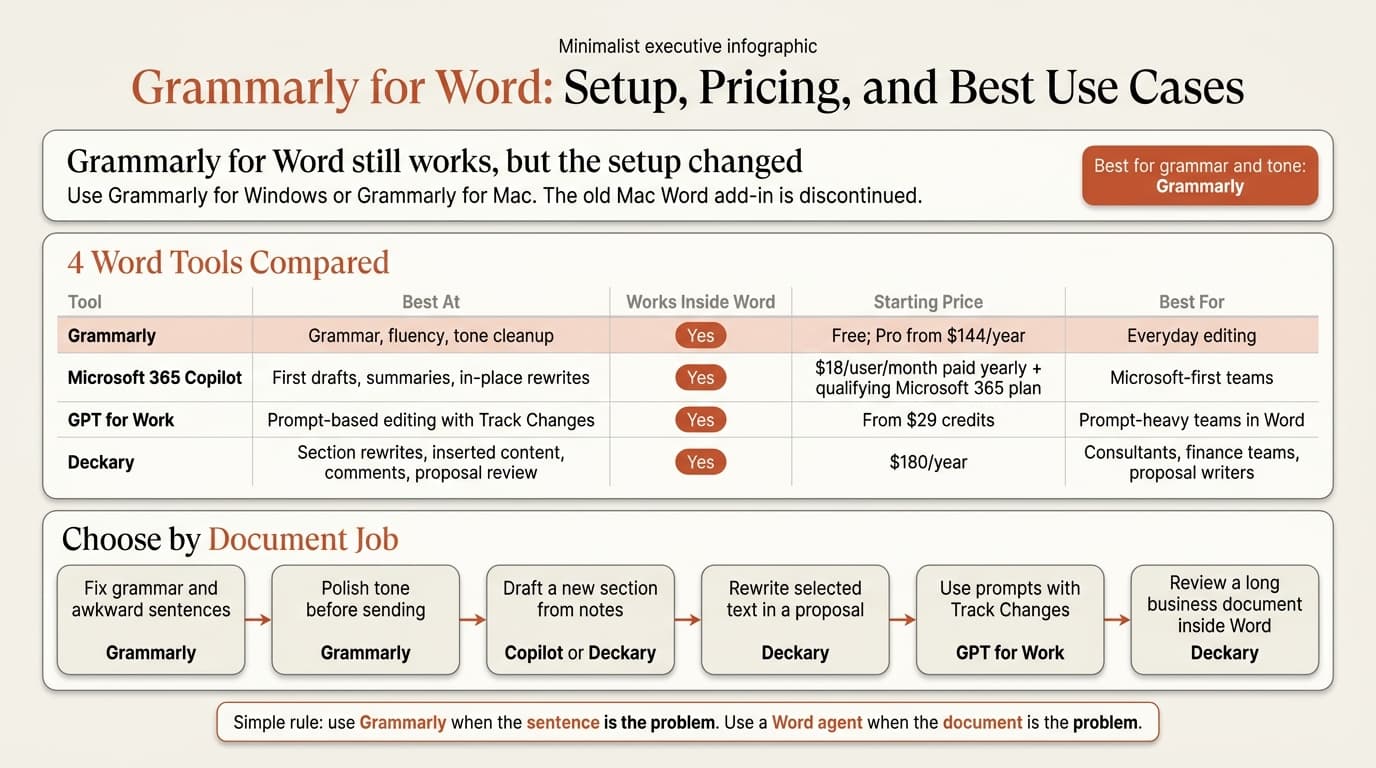
Grammarly for Word still works, but it no longer means what many people think it means. If you searched this keyword because you want the old Word plug-in, the first thing to know is that Grammarly is moving users away from the legacy Office add-in. On Windows, the current path is Grammarly for Windows. On Mac, Grammarly says the old Microsoft Word for Mac add-in was discontinued and recommends Grammarly for Mac instead.
That sounds like a small product detail, but it changes the buying decision. Grammarly for Word is still one of the easiest ways to catch grammar mistakes, tighten tone, and clean up awkward sentences inside Microsoft Word. It is not the best tool for every Word job. If you are drafting proposals, rewriting a memo section, reviewing a statement of work, or leaving comments on weak passages, you may need more than sentence polish.
We reviewed the top 5 Google results for "grammarly for word" on May 25, 2026, then verified 12 official product, support, pricing, and research pages across Grammarly, Microsoft, GPT for Work, and Deckary. We scored each option against 8 real document tasks: grammar correction, tone cleanup, first-draft writing, selected-text rewrites, long-document summaries, review comments, Word-native editing, and business-document fit. The live SERP is mostly setup pages and support articles, which tells you the search intent is practical: people want to know what Grammarly for Word is today and whether it is still worth using.
| Question | Short answer |
|---|---|
| Does Grammarly still work in Word? | Yes, through Grammarly for Windows or Grammarly for Mac. |
| Is the old Mac Word add-in still active? | No. Grammarly says it was discontinued. |
| Is Grammarly the best Word AI tool? | For grammar and tone, yes. For document drafting and review, not always. |
| Best alternative for business documents? | Deckary if the work needs rewrites, comments, and section-level edits inside Word. |
What Grammarly for Word is in 2026
Grammarly for Word is now better understood as Grammarly's desktop integration with Microsoft Word, not a simple old-school Office plug-in.
Grammarly's official Microsoft Word page says the product gives you real-time writing suggestions and AI features while you work in Word. Its support documentation fills in the part most people miss:
- The legacy Grammarly for Microsoft Office product is being retired and will no longer receive security updates, feature updates, or technical support.
- The old Grammarly for Microsoft Word on Mac add-in was discontinued.
- Grammarly now points users to Grammarly for Windows or Grammarly for Mac as the current route into Word.
That product-state confusion is why so many search results are troubleshooting pages instead of clean vendor comparisons.
| Platform | Current Grammarly path | What to know |
|---|---|---|
| Windows desktop Word | Grammarly for Windows | Grammarly says Word shows a list view of suggestions by category. |
| Mac desktop Word | Grammarly for Mac | The old Word add-in was discontinued. |
| Word Online | Supported through Grammarly for Windows or Grammarly for Mac | Grammarly says the browser extension alone is not the right route here. |
If you only want grammar correction, this is still fine. If you expected a deep document agent inside Word, it is less exciting. Grammarly helps at the sentence layer. It does not position itself as a proposal reviewer or document-workflow tool in the way newer Word AI products do.
Grammarly for Word pricing and setup
Grammarly keeps the entry point simple: free tier first, paid tier if you want more than basic correction.
Grammarly's support page for Pro pricing currently lists:
| Plan | Price | Best for |
|---|---|---|
| Free | $0 | Basic grammar, spelling, and light writing help |
| Pro monthly | $30/month | Short-term individual use |
| Pro quarterly | $60/three months | Mid-length use without annual commitment |
| Pro annual | $144/year | Lowest yearly cost for regular users |
Grammarly also notes that regional pricing can vary and that "Grammarly Pro" replaces the old Grammarly Business naming on that support page.
Setup is now straightforward, but it depends on platform:
- Install Grammarly for Windows if you use Word on Windows.
- Install Grammarly for Mac if you use Word on Mac.
- If you work in Word Online, use the desktop Grammarly app route rather than relying on the browser extension alone.
System requirements are also worth checking before you roll it out across a team. Grammarly's current support page says Grammarly for Windows requires Windows 10 or newer and a current Chrome or Edge version, while Grammarly for Mac requires macOS 11 or newer plus a current Chrome or Safari version.
For solo users, Grammarly is cheaper than Microsoft 365 Copilot and slightly cheaper than Deckary Premium, which is currently $180 per year and includes the AI Word Agent, AI Excel Agent, and PowerPoint AI. Price alone is not the real decision, though. The real question is what kind of work you need the tool to handle.
Continue reading: Bullet Charts in PowerPoint · PowerPoint Alignment Shortcuts · Appendix Slide PowerPoint
Create and edit Word documents with AI
Draft new content and edit professional documents directly in Word. 10 free AI prompts. No credit card required.
Where Grammarly for Word works well
Grammarly for Word is best when the writing problem is local and obvious.
That means:
| Document job | Is Grammarly good here? | Why |
|---|---|---|
| Fix grammar mistakes | Yes | This is still Grammarly's strongest job. |
| Tighten awkward sentences | Yes | It is quick and low-friction in Word. |
| Adjust tone or formality | Yes | Good for making a passage sound cleaner or more direct. |
| Clean up emails pasted into Word | Yes | Useful if Word is acting as your draft workspace. |
| Draft a full proposal from scratch | Partial | It can help, but it is not the strongest tool for structure and review. |
| Review a long memo section-by-section | Partial | Better than manual editing, but weaker than Word-native document agents. |
This matters because AI writing is now a routine work behavior, not a niche experiment. Microsoft and LinkedIn's 2024 Work Trend Index surveyed 31,000 knowledge workers across 31 markets and found that 75% already use AI at work. For many of those users, Grammarly is the easiest on-ramp because it sits close to the text and does not ask for much workflow change.
If your team spends most of its time cleaning sentences, fixing tone, and reducing small writing errors, Grammarly is still a good buy. That is especially true for general office writing where the output does not need heavy structure, comments, or tracked AI revision logic.
Where Grammarly for Word falls short for business documents
Grammarly for Word starts to feel thin when the document itself is the deliverable.
A proposal is not just a collection of polished sentences. It has a section sequence, a commercial recommendation, clear exclusions, next steps, and language that has to hold up in stakeholder review. The same is true for board memos, statements of work, and executive reports.
This is where Grammarly's Word integration feels narrower than the newer Word AI category:
| Need | Grammarly gap |
|---|---|
| Rewrite selected text with section context | Better than manual editing, but not purpose-built for section-aware business rewrites |
| Insert a new section at the cursor | Not its natural strength |
| Add review comments on weak logic | Not the main product job |
| Work through a long document as a document | Stronger tools now exist for this |
| Run a proposal review pass inside Word | Better handled by document agents |
There is also a data-handling point worth knowing before you use Grammarly on client or internal material. Grammarly's Microsoft Word page says that information used to power its generative AI features, including prompt type, prompt text, and the context in which the feature is used, is shared with a small number of vetted partners to provide the experience. Grammarly also says those partners are not allowed to use the data to train their own models or improve their own products. That is a reasonable disclosure, but teams working with sensitive material should still review it.
Oversight is the second issue. Microsoft's April 2026 research paper From Use to Oversight tested 48 participants and found that even users with better system understanding still needed active review. In one condition, they produced more grammatical errors, not fewer. The lesson is simple: polished AI output can still be wrong.
So if your document risk is low, Grammarly is fine. If your document risk is high, you need a tool and review process built for more than grammar.
Grammarly for Word vs Copilot, GPT for Work, and Deckary
The fastest way to evaluate Grammarly is to compare it with the other tools people now use in Word.
| Tool | Works inside Word | Best at | Starting price | Best fit |
|---|---|---|---|---|
| Grammarly | Yes | Grammar, fluency, tone cleanup | Free; Pro from $144/year | Everyday editing |
| Microsoft 365 Copilot | Yes | First drafts, summaries, in-place rewrites | $18/user/month paid yearly plus qualifying Microsoft 365 plan | Microsoft-first teams |
| GPT for Work | Yes | Prompt-driven editing with Track Changes | From $29 credits | Teams that want chat-style editing in Word |
| Deckary | Yes | Rewrites, inserted sections, comments, proposal review | $180/year | Consultants, finance teams, proposal writers |
Here is the honest routing:
- Choose Grammarly if your main pain is sentence quality.
- Choose Copilot if your organization already runs on Microsoft 365 and wants native drafting plus summaries.
- Choose GPT for Work if you want an add-in built around prompts and Track Changes.
- Choose Deckary if the work is proposals, memos, SOWs, reports, or review-heavy business documents inside Word.
Microsoft's current Copilot in Word support pages make that split clearer than marketing copy does. Copilot helps with drafting, rewriting, and summaries. Microsoft's newer Edit with Copilot in Word feature goes further with in-place edits and Word styles. GPT for Work's Word page says it supports rich text formatting and Track Changes. Deckary's homepage and pricing page position the Word agent around selected rewrites, inserted sections, summaries, and review comments for proposals and memos.
That is why Grammarly is not a universal "best Word AI" answer anymore. It is a category leader in one slice of the job, not the whole job.
If you are comparing the broader field, the closest related Deckary guides are AI Writing Assistant for Word, Word AI, How to Use AI in Microsoft Word, and How to Use Copilot in Word. If your team still uses browser prompting for this work, ChatGPT for Word is the useful bridge post.
Is Grammarly for Word worth it?
Yes, if you buy it for the right job.
Grammarly for Word is worth it when you want fewer grammar mistakes, tighter sentences, and cleaner tone inside Microsoft Word. It is still one of the quickest ways to improve average business writing without retraining the whole team.
It is not the best choice when your real problem is document structure, proposal logic, review comments, or safe section-by-section editing in a live Word file. In those cases, Grammarly is the polish layer, not the main tool.
The simplest rule is this: use Grammarly when the sentence is the problem. Use a Word agent when the document is the problem.
Sources
- Grammarly for Microsoft Word
- Grammarly Support: Grammarly for Microsoft Word on Mac was discontinued
- Grammarly Support: Grammarly for Microsoft Office will be discontinued soon
- Grammarly Support: How to add Grammarly to Microsoft Office on Windows
- Grammarly Support: Does Grammarly support Word Online?
- Grammarly Support: What do I need to use Grammarly?
- Grammarly Support: How much does Grammarly Pro cost?
- Microsoft Support: Welcome to Copilot in Word
- Microsoft Support: Edit with Copilot in Word
- Microsoft 365 Copilot pricing
- GPT for Work: GPT for Word
- GPT for Work pricing
- Deckary pricing
- Deckary homepage
- Microsoft and LinkedIn 2024 Work Trend Index
- Microsoft Research: From Use to Oversight
Related Guides
Create and edit Word documents with AI
Draft new content and edit professional documents directly in Word. 10 free AI prompts. No credit card required.