Eisenhower Matrix: The Complete Guide to Prioritization That Works
Eisenhower Matrix explained with real examples, common mistakes, and team-level strategies. Learn to categorize tasks across all four quadrants effectively.
The Eisenhower Matrix is the most widely used prioritization framework in business, and for good reason: it forces a decision on every task in under five seconds. Urgent or not? Important or not? The answer determines whether you do it, schedule it, delegate it, or drop it entirely.
After applying the Eisenhower Matrix across 60+ operations and transformation engagements, we have found that the framework's simplicity is both its greatest strength and its most common failure point. Teams that define "urgent" and "important" with clear criteria make better decisions. Teams that rely on gut feel end up with everything in Quadrant 1 and nothing getting delegated.
This guide covers how the Eisenhower Matrix works, walks through two detailed case studies showing how to classify real tasks with specific reasoning, and explains how it compares to other prioritization methods. For a broader view of strategy frameworks and when to use each one, see our Strategic Frameworks Guide.
What Is the Eisenhower Matrix?
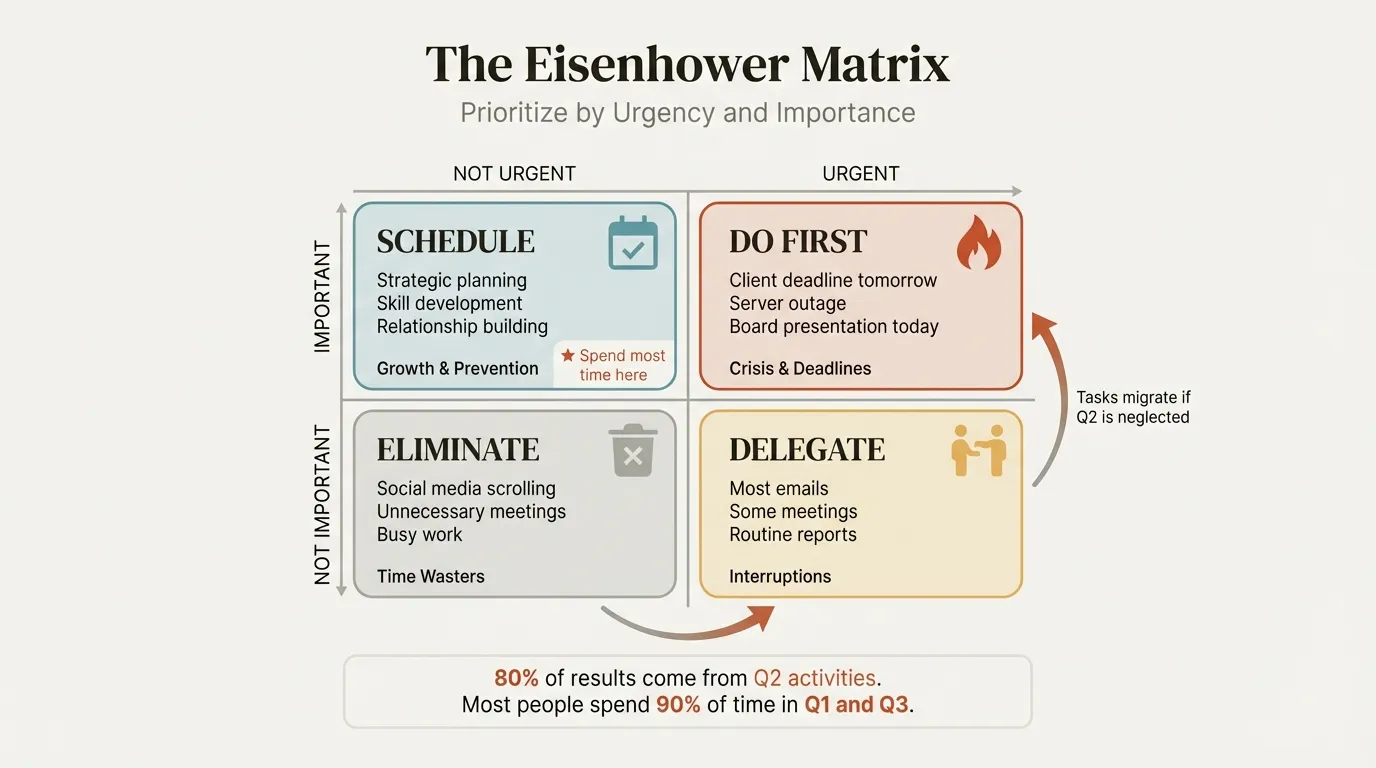
The Eisenhower Matrix is a 2x2 grid that categorizes tasks along two dimensions: urgency (time-sensitivity) and importance (contribution to long-term goals). Four quadrants, four actions:
| Quadrant | Label | Action |
|---|---|---|
| Q1 | Urgent + Important | Execute immediately |
| Q2 | Important, not urgent | Block time and plan |
| Q3 | Urgent, not important | Hand off to someone else |
| Q4 | Neither | Drop or stop doing |
The framework is named after President Eisenhower, who reportedly said: "What is important is seldom urgent and what is urgent is seldom important." Stephen Covey formalized it as the "Time Management Matrix" in The 7 Habits of Highly Effective People (1989).
The core insight: urgency is about deadlines and external pressure; importance is about impact on goals. Most people conflate the two, treating every urgent request as important. The matrix forces you to separate them.
Classifying Tasks: The Two Tests
Before sorting anything, you need explicit criteria. Without them, every task feels both urgent and important, and the matrix collapses into a single-quadrant to-do list.
Test 1 -- Urgency: Does this task have a hard deadline within 48 hours? "Hard" means contractual, regulatory, or a client commitment with material consequences for missing it. "My manager would prefer it sooner" does not qualify.
Test 2 -- Importance: Does this task directly advance one of your top three stated goals or OKRs for the quarter? If you cannot name the specific goal it serves, the task is not important in the Eisenhower sense -- regardless of who requested it.
Run every task through both tests. The intersection determines the quadrant:
- Passes both tests: Q1 -- Do it now.
- Passes importance but not urgency: Q2 -- Schedule a specific time.
- Passes urgency but not importance: Q3 -- Delegate or batch.
- Fails both: Q4 -- Eliminate.
This takes under 10 seconds per task once practiced. The case studies below show exactly how the reasoning works on real task lists. For more on building a daily prioritization habit, see our guide on how to prioritize tasks.
Worked Case Study 1: A Marketing Director's Monday Morning
Context: Sarah is a marketing director at a B2B SaaS company (Series B, 150 employees). Her three quarterly OKRs are: (1) increase qualified pipeline by 30%, (2) launch a brand refresh across all channels by March 15, and (3) reduce customer acquisition cost by 15%. It is Monday at 8:45 AM. She has 18 tasks competing for her week.
| # | Task | Deadline? | Advances OKR? | Quadrant | Reasoning |
|---|---|---|---|---|---|
| 1 | Approve final creative for product launch campaign going live Wednesday | Yes -- 36 hours | OKR 1 (pipeline) | Q1 | Hard launch date tied to a sales event; delay costs $12K in committed ad spend |
| 2 | Fix broken UTM parameters on three live Google Ads campaigns | No hard deadline, but bleeding $340/day in untracked spend | OKR 3 (CAC reduction) | Q1 | Every day unresolved wastes budget and corrupts attribution data; treating as urgent due to material cost |
| 3 | Respond to PR crisis: customer complaint going viral on LinkedIn (1,400 views, 90 comments) | Yes -- escalating hourly | None directly, but brand risk | Q1 | Not tied to an OKR but the reputational damage could undermine all three; exception case |
| 4 | Develop Q3 content strategy and editorial calendar | No -- due in 6 weeks | OKR 1 (pipeline) | Q2 | High-impact strategic work, but no deadline pressure this week |
| 5 | Build marketing attribution model linking spend to closed revenue | No -- ongoing initiative | OKR 3 (CAC reduction) | Q2 | This is the single highest-leverage project on the list; needs 12 hours of focused work over 3 weeks |
| 6 | Run 4 customer interviews for brand refresh positioning | No -- refresh due March 15 | OKR 2 (brand refresh) | Q2 | Important but interviews can be scheduled for next week without jeopardizing the March deadline |
| 7 | Write creative brief for brand refresh agency | Due Friday | OKR 2 (brand refresh) | Q1 | Agency needs this by Friday to stay on timeline; delay pushes the entire March 15 launch at risk |
| 8 | Review and approve 14 social media posts for the week | Content manager is waiting, posts scheduled for tomorrow | None -- these are business-as-usual | Q3 | Delegate to content manager with standing approval criteria: anything within brand guidelines ships without Sarah's review |
| 9 | Process marketing swag order for conference in 3 weeks | Vendor wants confirmation by Wednesday | None | Q3 | Delegate to marketing coordinator; provide budget cap of $2,500 and let them handle vendor communication |
| 10 | Respond to partnership inquiry from a MarTech vendor | They emailed twice last week | None | Q3 | Delegate: send standard partnership evaluation template and let the coordinator collect initial information |
| 11 | Attend weekly all-hands (60 minutes) where marketing has not been on the agenda in 8 weeks | Recurring -- today at 10 AM | None | Q4 | Skip and read the summary notes; reclaim 60 minutes for the attribution model (Q2) |
| 12 | Produce monthly marketing performance report | Recurring -- due Thursday | None directly | Q3 | Automate: dashboards already show the data; delegate to analyst with template; Sarah reviews final version in 10 minutes rather than building from scratch (was taking 3 hours) |
| 13 | Resize 6 blog images that the design tool auto-generates | No deadline | None | Q4 | Eliminate entirely; the auto-generated sizes are sufficient for blog use |
| 14 | Join recurring MarTech vendor demo call (45 minutes) | This afternoon | None -- already evaluated this tool category | Q4 | Decline the series; evaluation is complete |
| 15 | Research competitor's new messaging (saw their rebrand last week) | No deadline | Tangentially OKR 2 | Q4 | Interesting but not actionable this quarter; bookmark for Q3 planning |
| 16 | Update CRM tags for 200 marketing-sourced leads | No deadline, but sales asked last week | OKR 1 (pipeline) | Q3 | Delegate to marketing ops; provide the tagging criteria and let them batch-process it |
| 17 | Prepare deck for board meeting next month on marketing ROI | Due in 4 weeks | OKR 3 (CAC reduction) | Q2 | Important and will require the attribution model (task 5) first; schedule for week 3 |
| 18 | Reply to CEO's Slack asking for "quick thoughts" on a potential sponsorship | CEO is waiting | None -- sponsorship does not serve any OKR | Q3 | Respond with a brief assessment (15 minutes max) rather than doing full research; flag that sponsorship is outside current OKR scope |
Result: 4 tasks in Q1 (14 hours), 4 in Q2 (scheduled across the month), 6 in Q3 (delegated, saving 11 hours), 4 in Q4 (eliminated, saving 4 hours). Sarah's instinct was to put 9 of 18 tasks in Q1. Applying the two tests cut Q1 in half. The biggest win: recategorizing the monthly report (task 12) from Q1 to Q3 -- it felt important because it was visible, but it advanced no OKR and could be 90% automated.
Continue reading: Problem Solution Slide · Flowchart in PowerPoint · Startup Pitch Deck
Use consulting-grade layouts in PowerPoint
Start from structured business slides and customize them in your own deck. 14-day free trial. No credit card required.
Worked Case Study 2: A Consulting Team's Weekly Triage
Context: A six-person team at a management consulting firm is running a 16-week cost transformation engagement for a manufacturing client. They are in week 9. The team lead, Marcus, runs a 15-minute Monday triage with the full team. The client's goal is to identify $8M in annual cost savings by week 14. The team has identified $5.2M so far with 5 weeks remaining.
Here are the 12 tasks the team triaged that Monday:
| # | Task | Est. Hours | Quadrant | Assignment | Reasoning |
|---|---|---|---|---|---|
| 1 | Resolve data discrepancy: procurement spend data shows $2.1M gap vs. client's GL | 8 hrs | Q1 | Marcus + senior analyst | Blocks the savings waterfall; steering committee in 3 days will ask about this number; $2.1M gap could mean the team has already hit $7.3M or is stuck at $5.2M |
| 2 | Prepare steering committee deck (Thursday) | 6 hrs | Q1 | Marcus drafts, analyst formats | Hard deadline, partner has already blocked Thursday at 2 PM with the CFO |
| 3 | Conduct 3 remaining procurement category deep-dives (packaging, logistics, MRO) | 15 hrs across the week | Q2 | Two analysts, 5 hrs each | These are the highest-probability path to closing the $2.8M savings gap; no hard deadline this week but delaying pushes analysis into the final 3 weeks |
| 4 | Build the "ease of implementation" scoring model for all 40+ identified initiatives | 10 hrs | Q2 | Senior analyst | Client asked for this at the last steering committee; due week 12; needs to be started this week to allow two rounds of iteration |
| 5 | Update the savings tracker spreadsheet with last week's validated amounts | 2 hrs | Q3 | Junior analyst | Routine data entry; Marcus had been doing this himself, taking time from analysis; junior analyst can follow the existing template |
| 6 | Schedule and send interview confirmations for 6 plant managers (interviews next week) | 1.5 hrs | Q3 | Junior analyst | Administrative; does not require Marcus's involvement; provide the list of names, the interview guide, and let the analyst coordinate |
| 7 | Respond to client HR's request for the team's office badge renewal forms | 0.5 hrs | Q3 | Junior analyst | Urgent for the client admin, zero impact on the engagement's deliverables |
| 8 | Reformat 35 appendix slides to firm visual standards | 7 hrs | Q3 | Junior analyst (across 2 days) | Partner wants these "polished" but the appendix has not been referenced in any steering committee; delegating frees 7 hours of senior time for category deep-dives (task 3) |
| 9 | Attend client's internal town hall on "operational excellence culture" (90 minutes) | 1.5 hrs | Q4 | No one attends | Team was CC'd on the invite; no decision items, no data the team needs; politely decline |
| 10 | Create "change management communications plan" that the client PMO requested | 5 hrs | Q4 | Flag to partner | Outside engagement scope; the team is contracted for cost identification, not implementation; Marcus flags to the partner to manage the client's expectation rather than absorbing unscoped work |
| 11 | Build a draft final presentation outline (due week 14) | 4 hrs | Q2 | Marcus | Five weeks out, but starting the skeleton now prevents a week-13 scramble; schedule 2 hours Thursday after steering committee, 2 hours Friday |
| 12 | Compile benchmarking data from 3 public industry reports for the logistics category | 3 hrs | Q3 | Junior analyst | Data gathering that does not require consulting judgment; provide the source list and the specific metrics needed |
Result: Tasks 5, 6, 7, 8, and 12 moved to the junior analyst -- 14 hours of delegated work that freed senior capacity for the $2.8M problem. Marcus blocked three 2-hour Q2 slots (Tuesday, Thursday, Friday mornings), non-interruptible except for genuine Q1 items.
The key insight: The team's instinct was to accept the change management plan (task 10) because the client PMO asked for it. Absorbing 5 hours of unscoped work when the team is $2.8M short of target with 5 weeks remaining is not a prioritization failure -- it is a scope management failure. Marcus flagged it to the partner instead.
Common Eisenhower Matrix Mistakes
Mistake 1: Overloading Quadrant 1
Sarah's first pass put 9 of 18 tasks in Q1. After applying the two tests, genuine Q1 dropped to 4. If more than 20% of your tasks are in Q1, your urgency definition is too loose.
Mistake 2: Starving Quadrant 2
Q2 is the easiest to postpone because nothing forces your hand. In the consulting case study, skipping the procurement deep-dives (Q2) in favor of appendix formatting (Q3) would have created a week-13 crisis with a $2.8M shortfall and no analysis to close it. Block Q2 time first, before Q1 and Q3 fill every slot.
Mistake 3: Refusing to Delegate
Marcus was personally updating the savings tracker and formatting appendix slides -- tasks a junior analyst could handle at 80% quality. Delegating freed 14 hours of senior capacity for the $2.8M problem. Accept 80% quality on Q3 tasks; the time you recover for Q2 more than compensates.
Mistake 4: Not Revisiting Weekly
Sarah's brand refresh brief (task 7) was Q2 three weeks ago; it became Q1 as the Friday deadline approached. A static matrix goes stale within days. Run a 15-minute Monday triage to keep it current.
Mistake 5: Following the Emotional Pull of Q3
Behavioral researchers call this the mere urgency effect -- urgent tasks trigger a dopamine response that makes them feel more rewarding than important ones. Sarah's instinct to immediately handle the CEO's sponsorship Slack (task 18) was driven by the sender's seniority, not OKR alignment. When you reach for a Q3 task over Q2, ask: "Am I choosing this because it matters or because it is easier?"
Scaling the Eisenhower Matrix Beyond Individual Use
The consulting case study above demonstrates team-level triage -- a 15-minute Monday session where the team collectively sorts incoming work. That shared sorting creates alignment that individual prioritization cannot. When everyone agrees on what constitutes "important," the team stops context-switching on low-value requests.
At the portfolio level, the same logic applies. Plot active projects on the grid and resource accordingly. We have applied this approach in portfolio rationalization exercises where organizations had 40+ active initiatives competing for the same 200-person team. The matrix reduced the active portfolio to 15 initiatives, and throughput on the remaining projects increased by roughly 35%.
For decisions where two dimensions are not enough, a decision matrix lets you weight and score options across five or more dimensions. The Eisenhower Matrix tells you what to work on; the decision matrix tells you how to choose between options within a quadrant.
Eisenhower Matrix vs. Other Frameworks
| Framework | Best For | Speed | Key Limitation |
|---|---|---|---|
| Eisenhower Matrix | Daily/weekly task triage | Seconds per task | No nuance within a quadrant |
| MoSCoW | Scope negotiation | Minutes per item | No effort or dependency tracking |
| RICE | Product backlog ranking | 2-3 min per item | Subjective scoring, high overhead |
| Impact-Effort Matrix | Quick wins identification | Minutes per item | No urgency dimension |
| Weighted Scoring (prioritization matrix) | Multi-stakeholder decisions | Slowest | False precision risk |
Use the Eisenhower Matrix for daily decisions with 10-50 tasks. Use RICE or MoSCoW when team-level or stakeholder-level prioritization requires more structured scoring. For a detailed comparison of all five methods, see how to prioritize tasks.
For more Eisenhower Matrix examples across industries and roles, see our dedicated examples post.
Summary
The Eisenhower Matrix works because it reduces prioritization to two questions: Is this urgent? Is this important? That simplicity makes it fast enough to use daily and intuitive enough to apply across individuals, teams, and portfolios.
Key principles:
- Separate urgency from importance -- they are not the same thing, and conflating them is the primary source of poor prioritization
- Apply explicit tests -- "urgent" means a hard deadline within 48 hours with material consequences; "important" means it advances a stated goal or OKR
- Invest in Q2 -- important but not urgent work prevents future crises and drives long-term results, as both case studies demonstrate
- Delegate Q3, eliminate Q4 -- Sarah reclaimed 15 hours per week; Marcus's team freed 14 hours of senior capacity in a single triage session
- Revisit weekly -- a static matrix goes stale within days; a 15-minute Monday triage keeps it current
For ready-to-use layouts, explore the Eisenhower Matrix template or browse the full strategic frameworks collection. For hands-on examples of the matrix applied across different roles and industries, see Eisenhower Matrix Examples.
Use consulting-grade layouts in PowerPoint
Start from structured business slides and customize them in your own deck. 14-day free trial. No credit card required.