Decision Matrix Template: A Step-by-Step Guide to Weighted Scoring
Free decision matrix template with 3 worked examples. Step-by-step weighted scoring, Pugh matrix, sensitivity testing, and common mistakes to avoid.
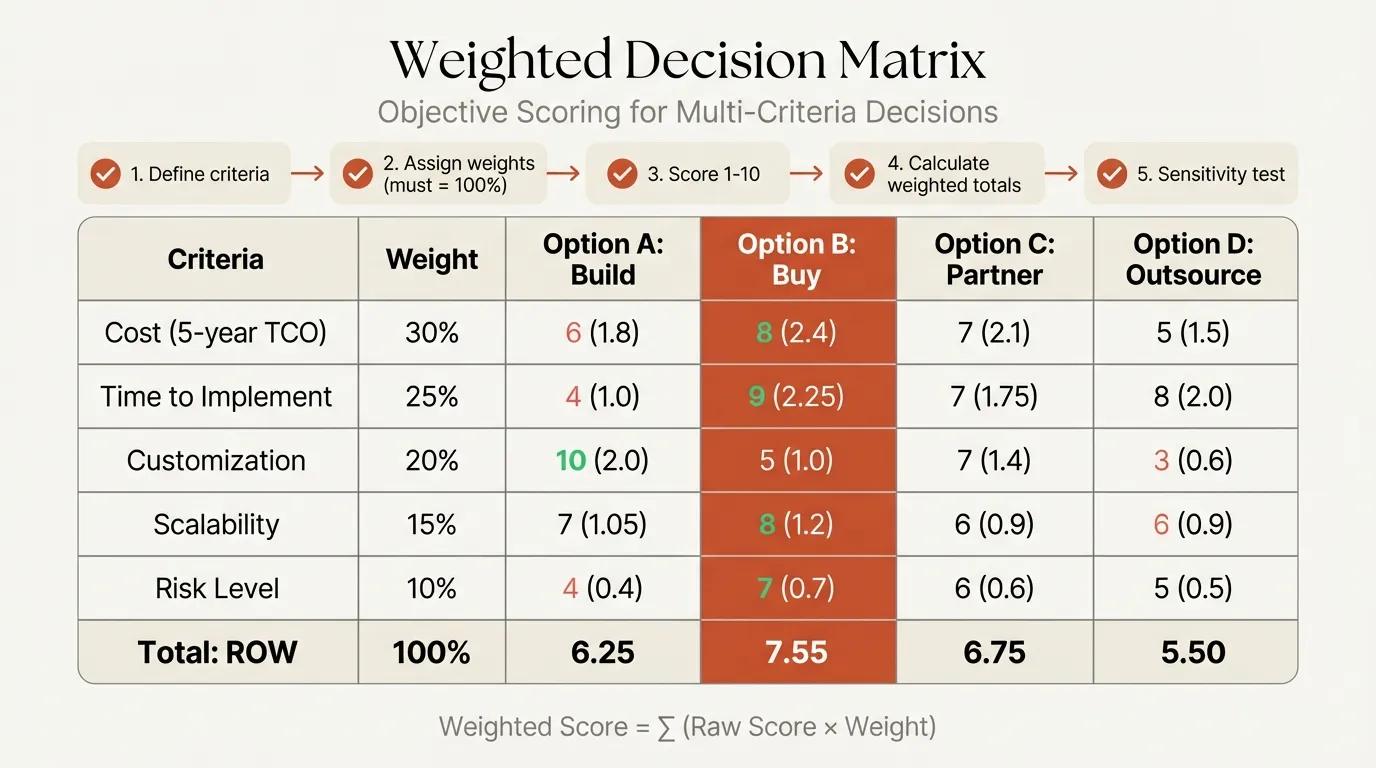
A decision matrix template turns subjective debates into structured evaluations. Instead of arguing about which vendor "feels right" or which office location the loudest stakeholder prefers, you define criteria, assign weights, score each option, and let the math surface the strongest choice.
The method goes by several names -- weighted scoring model, Pugh matrix, multi-criteria decision analysis (MCDA) -- but the core process is the same: break a complex decision into measurable dimensions, weight those dimensions by importance, and score systematically.
After applying decision matrices across 120+ vendor evaluations, site selections, and technology platform decisions, we have found that the framework consistently outperforms unstructured deliberation when three or more options compete on four or more criteria. This guide covers the step-by-step process, three worked examples with filled-in scoring tables, the main types of decision matrices, a comparison to other decision-making frameworks, and the mistakes that undermine the results. For the broader toolkit, see our Strategic Frameworks Guide.
When to Use a Decision Matrix (and When Not To)
A decision matrix is powerful, but it is not always the right tool. Before building one, run through this checklist:
Use a decision matrix when:
- You have 3 or more options to compare
- The decision involves 4 or more criteria that vary in importance
- Multiple stakeholders need to agree, and you need an auditable rationale
- The decision is reversible with moderate cost (vendor selection, office location, tool choice)
Do not use a decision matrix when:
| Situation | Why Not | Better Alternative |
|---|---|---|
| Only 2 options | A matrix adds overhead without value | Simple pros/cons list or go/no-go analysis |
| One criterion dominates completely | Weighting is meaningless when cost is 90% of the decision | Filter by the dominant criterion first, then evaluate finalists |
| Sequential decisions with uncertainty | Matrices assume a single-stage, static evaluation | Decision tree with probability-weighted outcomes |
| You already know the answer | Building a matrix to justify a predetermined choice wastes time and erodes trust | Be honest about the decision and present your rationale directly |
| Criteria are not independently assessable | If "ease of use" and "training cost" are essentially the same thing, your matrix double-counts | Consolidate overlapping criteria before scoring |
The matrix is a decision-support tool, not a decision-making tool. It structures the conversation, but it does not replace judgment.
What Is a Decision Matrix Template?
A decision matrix template is a structured table where rows represent options (the things you are choosing between) and columns represent criteria (the factors that matter). Each criterion carries a weight reflecting its relative importance, and each option receives a score on each criterion. Multiplying scores by weights and summing across criteria produces a weighted total per option. The highest total indicates the strongest choice.
| Component | Description | Example |
|---|---|---|
| Options | Alternatives being evaluated | Vendor A, Vendor B, Vendor C |
| Criteria | Factors that influence the decision | Cost, reliability, scalability, support |
| Weights | Relative importance of each criterion (sum to 100%) | Cost = 30%, Reliability = 25%, Scalability = 25%, Support = 20% |
| Scores | Rating of each option on each criterion (e.g., 1-5) | Vendor A scores 4/5 on cost |
| Weighted score | Score x Weight for each cell | 4 x 0.30 = 1.20 |
| Total | Sum of weighted scores per option | Vendor A total = 3.85 |
The template forces transparency. When stakeholders disagree on the recommendation, you can trace the disagreement to a specific weight or score rather than debating the conclusion in the abstract. For a ready-to-use PowerPoint version, see our Prioritization Matrix Template.
How to Build a Decision Matrix in 6 Steps
Step 1: Define Your Options
List all viable alternatives. Include 3-7 options. Fewer than 3 usually means the decision does not warrant a matrix. More than 7 makes scoring tedious -- screen down to a shortlist first using a Pugh matrix if needed.
Step 2: Identify Criteria
Brainstorm every factor that matters, then consolidate to 4-8 criteria. Group related factors (e.g., "onboarding time" and "learning curve" become "ease of adoption"). Each criterion should be independently assessable -- avoid criteria that overlap significantly with others.
Step 3: Assign Weights
Distribute 100 points across criteria based on relative importance. Two approaches work well:
Direct allocation: The decision-maker or steering committee distributes 100 points. Fast but can be influenced by whoever speaks first.
Pairwise comparison: Compare each criterion against every other, tallying wins -- a technique rooted in the Analytic Hierarchy Process developed by Thomas Saaty. A criterion that beats 4 out of 5 others gets a weight of roughly 4/15 = 27%. Slower but reduces anchoring bias.
The cardinal rule: never weight everything equally. Equal weighting is the most common mistake in decision matrices. It says "cost matters exactly as much as support quality," which is almost never true.
Step 4: Score Each Option
Rate every option on every criterion using a consistent scale (1-5 or 1-10). Define what each score means before scoring to prevent drift:
| Score (1-5 scale) | Meaning |
|---|---|
| 1 | Does not meet requirement |
| 2 | Partially meets requirement |
| 3 | Meets requirement |
| 4 | Exceeds requirement |
| 5 | Best-in-class |
Score one criterion at a time across all options (not one option at a time across all criteria). This forces relative comparison and reduces the halo effect where a strong impression on one criterion inflates all others.
Step 5: Calculate Weighted Scores
Multiply each score by the criterion weight. Sum across criteria for each option. The math is simple arithmetic, but doing it in a table keeps the logic auditable.
Step 6: Analyze and Decide
The highest total is the recommended choice, but do not stop there. Check whether the result changes if you shift the top weight by plus or minus 5 points. If a small weight change flips the winner, the decision is too close to call on numbers alone -- you need more data or stakeholder alignment on weights.
Decision Matrix Template Example 1: Vendor Selection
A mid-market SaaS company is selecting a cloud infrastructure vendor from three finalists.
Criteria and weights (agreed upon by CTO and VP Engineering):
| Criterion | Weight |
|---|---|
| Total cost of ownership (3 yr) | 30% |
| Reliability (uptime SLA) | 25% |
| Scalability | 20% |
| Developer tooling | 15% |
| Support responsiveness | 10% |
Scoring (1-5 scale):
| Criterion | Weight | Vendor A | Vendor B | Vendor C |
|---|---|---|---|---|
| Cost (3 yr) | 0.30 | 4 | 3 | 5 |
| Reliability | 0.25 | 5 | 4 | 3 |
| Scalability | 0.20 | 4 | 5 | 3 |
| Developer tooling | 0.15 | 3 | 5 | 2 |
| Support | 0.10 | 4 | 3 | 4 |
Weighted scores:
| Criterion | Vendor A | Vendor B | Vendor C |
|---|---|---|---|
| Cost | 1.20 | 0.90 | 1.50 |
| Reliability | 1.25 | 1.00 | 0.75 |
| Scalability | 0.80 | 1.00 | 0.60 |
| Developer tooling | 0.45 | 0.75 | 0.30 |
| Support | 0.40 | 0.30 | 0.40 |
| Total | 4.10 | 3.95 | 3.55 |
Result: Vendor A wins with a total of 4.10, driven by its reliability score. Vendor B is close behind at 3.95, with an edge in scalability and developer tooling. If the team later decides developer tooling deserves 25% weight instead of 15%, Vendor B overtakes Vendor A. That weight sensitivity is worth surfacing to the decision-makers.
Continue reading: Agenda Slide PowerPoint · Tornado Charts in PowerPoint · Competitive Landscape Slide
Use consulting-grade layouts in PowerPoint
Start from structured business slides and customize them in your own deck. 14-day free trial. No credit card required.
Decision Matrix Template Example 2: Office Location
A consulting firm is choosing between three cities for a new regional office.
| Criterion | Weight | City X | City Y | City Z |
|---|---|---|---|---|
| Talent availability | 0.30 | 5 | 4 | 3 |
| Office lease cost | 0.25 | 2 | 4 | 5 |
| Client proximity | 0.20 | 5 | 3 | 2 |
| Quality of life | 0.15 | 4 | 5 | 4 |
| Transport links | 0.10 | 5 | 3 | 3 |
Weighted totals: City X = 4.05, City Y = 3.85, City Z = 3.45
City X leads despite its high lease cost because talent availability (30% weight) and client proximity (20% weight) carry the decision. If the firm is cost-constrained and raises lease cost weight to 35%, City Y moves ahead. This is the value of the matrix: it makes trade-offs explicit rather than leaving them buried in meeting dynamics.
Decision Matrix Template Example 3: Technology Platform
A financial services firm is choosing between three CRM platforms for its advisory team.
| Criterion | Weight | Platform A | Platform B | Platform C |
|---|---|---|---|---|
| Integration with existing stack | 0.25 | 5 | 3 | 4 |
| Compliance features | 0.25 | 4 | 5 | 3 |
| User adoption risk | 0.20 | 3 | 4 | 5 |
| Customization depth | 0.15 | 4 | 5 | 2 |
| Total cost (5 yr) | 0.15 | 3 | 2 | 5 |
Weighted totals: Platform A = 3.95, Platform B = 3.85, Platform C = 3.80
All three platforms score within 0.15 of each other. When the gap is this narrow, the matrix is telling you the options are genuinely comparable on your stated criteria. The decision should then shift to qualitative factors not captured in the matrix -- reference calls, pilot results, or vendor strategic direction -- rather than treating a 0.10 difference as decisive.
Sensitivity Testing: Is Your Decision Robust?
A weighted total of 4.10 versus 3.95 looks decisive in a table. But how stable is that result? Sensitivity testing answers the question: would a reasonable change in weights flip the winner?
How to Run a Sensitivity Test
Take the top two options from your matrix. For each criterion, calculate how much the weight would need to shift to make the second-place option overtake the first. This is the breakpoint weight.
Using Example 1 (Vendor A = 4.10, Vendor B = 3.95):
| Criterion | Current Weight | Breakpoint Weight | Shift Needed | Verdict |
|---|---|---|---|---|
| Cost | 30% | 35% | +5% | Fragile — small shift flips result |
| Reliability | 25% | 18% | -7% | Moderate — significant shift needed |
| Developer Tooling | 15% | 23% | +8% | Stable — large shift needed |
| Scalability | 20% | 28% | +8% | Stable |
| Support | 10% | 14% | +4% | Fragile |
Two criteria (Cost, Support) have breakpoints within 5 percentage points of their current weights. This tells you the decision between Vendor A and Vendor B hinges on how much you value cost and support relative to reliability and scalability.
Interpreting Results
| Minimum Shift to Flip | Decision Quality |
|---|---|
| Under 5 percentage points | Fragile — gather more data or align stakeholders on weights before committing |
| 5 to 10 percentage points | Moderate — the result is directionally correct but not definitive |
| Over 10 percentage points | Robust — the winner holds up across reasonable weight assumptions |
The Post-Decision Gut Check
After the math, ask three questions:
- Does the winner feel wrong? If yes, you are missing a criterion. Identify what is bothering you and add it to the matrix.
- Would you defend this choice to your boss? If not, your weights may not reflect the organization's true priorities.
- If the winner fails, what will you regret not considering? That regret usually points to a risk factor that deserves its own criterion or higher weight.
The matrix structures the decision; the gut check catches what the matrix missed.
Types of Decision Matrices
Not every decision needs a full weighted scoring exercise. Match the method to the complexity.
Simple Pros/Cons List
The most basic form. List advantages and disadvantages for each option. No weights, no scores. Works when the decision has 2 options and the trade-offs are obvious. Falls apart with 3+ options or criteria that vary in importance.
Weighted Scoring Matrix
The standard approach described in this guide. Best for decisions with 3-7 options and 4-8 criteria where stakeholders need an auditable rationale. This is what most people mean when they say "decision matrix."
Pugh Matrix (Simplified Comparison)
Named after Stuart Pugh, this method compares options against a baseline using relative scores: better (+1), same (0), or worse (-1). Optionally, you can weight the criteria and multiply.
| Criterion | Weight | Baseline | Option B | Option C |
|---|---|---|---|---|
| Cost | 0.30 | 0 | +1 | -1 |
| Speed | 0.25 | 0 | -1 | +1 |
| Quality | 0.25 | 0 | +1 | 0 |
| Risk | 0.20 | 0 | 0 | -1 |
Weighted Pugh scores: Option B = +0.30 - 0.25 + 0.25 + 0 = +0.30. Option C = -0.30 + 0.25 + 0 - 0.20 = -0.25.
Option B improves on the baseline; Option C is worse overall. The Pugh matrix is faster than full scoring and works well for initial screening when you have 8-10 options and need to narrow to a shortlist of 3.
Paired Comparison Matrix
Used for weighting criteria rather than scoring options. Compare every criterion against every other criterion and record which is more important. The win count determines the weight.
| Cost | Speed | Quality | Risk | Wins | Weight | |
|---|---|---|---|---|---|---|
| Cost | -- | Cost | Quality | Cost | 2 | 33% |
| Speed | -- | Quality | Speed | 1 | 17% | |
| Quality | -- | Quality | 3 | 50% | ||
| Risk | -- | 0 | 0% |
This method forces you to make hard trade-offs between criteria rather than giving everything a "high" weight. It is especially useful with multi-stakeholder groups where consensus on weights is difficult.
Decision Matrix vs. Other Decision-Making Frameworks
Different decisions call for different tools. Here is when to use each.
| Framework | Best For | Input Required | Output | Limitation |
|---|---|---|---|---|
| Decision matrix | Comparing 3-7 options on multiple criteria | Criteria, weights, scores | Ranked list with weighted totals | No sequential logic; assumes static criteria |
| Decision tree | Sequential decisions under uncertainty | Probabilities, payoffs | Optimal path with expected value | Requires probability estimates; branches explode with complexity |
| Cost-benefit analysis | Go/no-go decisions on a single option | Quantified costs and benefits | Net present value or ROI | Difficult to quantify intangible benefits |
| Eisenhower Matrix | Personal/team task prioritization | Urgency and importance assessment | Four-quadrant action plan | Binary categories; no nuance within quadrants |
| SWOT analysis | Strategic position assessment | Strengths, weaknesses, opportunities, threats | Qualitative landscape view | No prioritization; lists without ranking |
| RICE scoring | Product feature prioritization | Reach, Impact, Confidence, Effort estimates | Priority score per feature | Designed for product backlogs, not general decisions |
| Kepner-Tregoe | Complex decisions with mandatory requirements | Must-have vs want criteria, risk assessment | Weighted ranking with risk overlay | Heavier process; overkill for simple decisions |
| Dot voting | Quick team consensus on priorities | Team votes (3-5 dots per person) | Visual priority ranking | No weighting; influenced by groupthink and presentation order |
| Six Thinking Hats | Exploring a decision from multiple perspectives | Group discussion through 6 lenses | Richer understanding, not a ranked output | Does not produce a numerical ranking |
Decision rules:
- Choose between options on multiple criteria? Decision matrix.
- Sequential decisions with uncertain outcomes? Decision tree.
- Single option, go or no-go? Cost-benefit analysis.
- Sorting daily/weekly tasks? Eisenhower Matrix.
- Prioritizing a product backlog? RICE scoring.
- Quick team alignment with 10+ options? Dot voting to shortlist, then decision matrix.
- Understanding strategic position before deciding? SWOT, then one of the above.
For more on how to prioritize tasks at the individual and team level, see our dedicated guide.
Common Decision Matrix Mistakes
Mistake 1: Too Many Criteria
Adding 12-15 criteria feels thorough but dilutes the impact of the factors that actually matter. Each additional criterion reduces the weight available for every other criterion, and scoring fatigue leads to careless ratings on criteria 10 through 15.
Fix: Cap at 8 criteria. Group related factors into categories. If "response time," "availability," and "escalation process" all matter, combine them into "support quality" and define what a score of 4 means for that combined criterion.
Mistake 2: Equal Weighting Everything
Distributing weight equally across criteria is the single most common failure. It implicitly claims that cost matters exactly as much as support quality, which is rarely true. Equal weighting often produces a result identical to averaging raw scores, which defeats the purpose of the matrix.
Fix: Use pairwise comparison or direct allocation. Force trade-offs. If a stakeholder insists everything is equally important, ask: "If you could only improve one criterion, which would you choose?" That answer reveals the real weighting.
Mistake 3: Anchoring Bias in Scoring
The first option scored sets a mental reference point. Subsequent options get rated relative to that anchor rather than against the objective scale definition. If Vendor A scores 4 on cost, Vendor B automatically gets judged as "a bit cheaper, so maybe a 5" rather than being independently assessed.
Fix: Score one criterion at a time across all options (horizontal, not vertical). Define the scale before scoring. Use the scale definitions to calibrate each score independently.
Mistake 4: Ignoring Sensitivity
Treating the weighted total as a precise answer rather than an estimate. A score of 4.10 versus 3.95 looks decisive in a table, but shift one weight by 5 points and the ranking can flip.
Fix: After computing totals, test the top two weights. Ask: "What weight change would make the second-place option win?" If the answer is a small shift, acknowledge the decision is close and supplement with qualitative judgment.
Mistake 5: Using the Matrix to Justify a Predetermined Choice
The most insidious failure. Someone has already decided and constructs weights and scores to confirm their preference. The matrix becomes a rationalization tool rather than a decision tool.
Fix: Set criteria and weights before seeing any option-specific data. Lock weights with stakeholder sign-off, then score. If the process runs in the right order, the matrix challenges rather than confirms assumptions.
Key Takeaways
A decision matrix template works because it decomposes a complex judgment into individually assessable parts. The framework is not a calculator that produces the "right answer" -- it is a structured conversation that surfaces disagreements about what matters and how well each option delivers.
Core principles:
- 4-8 criteria, never equal-weighted -- the matrix's value comes from forcing trade-offs between criteria
- Score horizontally -- evaluate one criterion across all options to reduce anchoring and halo effects
- Test sensitivity -- if a small weight change flips the winner, the decision needs more data, not more decimals
- Match the method to the complexity -- simple pros/cons for 2 options, Pugh matrix for screening 8+, full weighted scoring for the final 3-5
- Set weights before scoring -- locking criteria and weights first prevents reverse-engineering the outcome
For a ready-to-use layout, download the Prioritization Matrix Template. For sequential decisions with probabilistic outcomes, switch to a decision tree. For the complete frameworks toolkit, see our Strategic Frameworks Guide.
Use consulting-grade layouts in PowerPoint
Start from structured business slides and customize them in your own deck. 14-day free trial. No credit card required.