AI Memo Writer: 6 Tools for Business Memos in Word
AI memo writer tools compared for Word workflows, pricing, and memo quality. See which option fits executive briefs, policy memos, and internal updates.
- Bob · Former McKinsey and Deloitte consultant with 6 years of experience
- May 17, 2026
- 11 min read
Pricing and feature information was accurate at the time of publication. Competitor products change frequently — verify current details on each provider's website.
An AI memo writer is only useful if it helps you finish a real business memo, not just generate a polite block of text. For teams that work in Microsoft Word, Deckary is the best fit because it drafts, rewrites, summarizes, and reviews memos inside the document instead of pushing the work into a separate browser tab.
We reviewed the top 5 live Google results for "ai memo writer" on May 25, 2026. The first page leaned toward vendor landing pages such as Flowith, Template.net, and HyperWrite rather than neutral buying guides. We then verified 13 official product, pricing, and support sources across 6 tools, and scored each option against 7 memo jobs: first-draft writing, selected-text rewrite, Word-native editing, review flow, pricing clarity, executive-tone control, and suitability for business memos.
If you need the short answer, use Deckary when the memo must stay in Word, use Copilot when your company already runs on Microsoft 365, use GPT for Work when you want prompt-driven edits inside Word, and use Template.net or HyperWrite when speed matters more than document control.
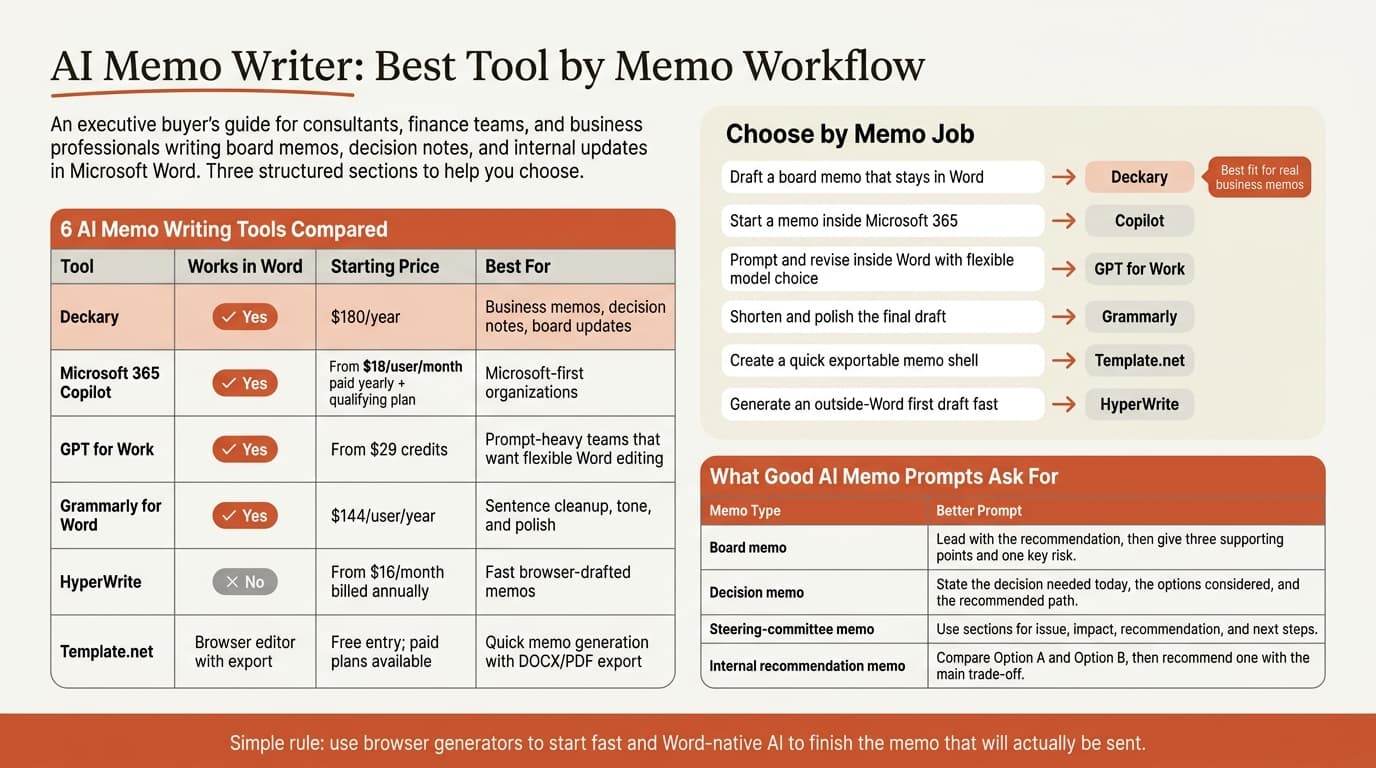
| Tool | Works inside Word | Starting price | Best for |
|---|---|---|---|
| Deckary | Yes | $180/year | Business memos, decision notes, board updates |
| Microsoft 365 Copilot | Yes | From $18/user/month paid yearly, plus qualifying Microsoft 365 plan | Microsoft-first organizations |
| GPT for Work | Yes | From $29 credits | Prompt-heavy teams that want flexible Word editing |
| Grammarly for Word | Yes | $144/user/year | Sentence cleanup, tone, and polish |
| HyperWrite | No | From $16/month billed annually | Fast browser-drafted memos |
| Template.net | Browser editor with export | Free entry; paid plans available | Quick memo generation with DOCX/PDF export |
Pricing and feature details were verified on May 25, 2026. Regional pricing and enterprise discounts can vary.
What an AI memo writer is
An AI memo writer is software that turns a prompt, rough notes, or an existing draft into a business memo.
That sounds broad, but memo writing is narrower than general document generation. A useful memo has a clear audience, a fast recommendation, supporting facts, and an obvious next step. It is not just "a short report." It is a decision document.
That distinction matters because the market is still messy. Microsoft's and LinkedIn's 2024 Work Trend Index surveyed 31,000 people across 31 countries and found that 75% of knowledge workers already use AI at work. Thomson Reuters' 2024 Future of Professionals Report surveyed more than 2,200 professionals and found that respondents expected AI to free up 4 hours per week within one year and 12 hours per week within five years. Memo drafting is one of the easier places to get that time back because the structure repeats so often.
The harder part is quality control. Most memo writers can generate something plausible. Far fewer help you keep the recommendation sharp, the tone executive-friendly, and the review process inside the final Word file.
AI memo writer tools compared
The best AI memo writer depends on where the memo lives after the first draft.
Deckary
Deckary is the best option when the memo itself is the deliverable. Deckary's pricing page lists Premium at $180 per year, and that plan includes the AI Word Agent alongside the Excel and PowerPoint agents. The Word workflow matters more than the raw model output. You can draft from a prompt, rewrite selected text, summarize a longer memo, and review the document without leaving Word.
That is a better fit for steering-committee memos, internal recommendation notes, board updates, and issue memos than a browser-only generator. If the memo will go through comments, revisions, and last-minute tightening, Word-native editing saves real time.
Microsoft 365 Copilot
Microsoft 365 Copilot is the default benchmark because it already lives in Word. Microsoft says Edit with Copilot can create, edit, refine, and format content in place using Word's built-in styles and features. Microsoft's current business pricing page shows Copilot Business from $18 per user per month paid yearly, with a separate qualifying Microsoft 365 plan required.
Copilot is strong for blank-page starts and broad rewrites. The trade-off is control. Microsoft's support page says Edit with Copilot cannot add or modify comments in Word at this time, even though it respects Track Changes when Track Changes is already on. If your memo workflow depends on comment-based review, that limitation matters.
GPT for Work
GPT for Work positions its Microsoft bundle as an add-in for Excel and Word, and its documentation says the Word side works as a writing assistant for editing, rewriting, correcting, reviewing, translating, summarizing, and drafting. Its pricing page starts at $29 in credits instead of a monthly seat fee.
That credit model is useful for smaller teams that do not want another per-user subscription. GPT for Work is a good choice when the team prefers prompt-led work and wants model choice. It is less opinionated than Deckary about business-document workflows, but it is a serious option if you want Word-native editing without committing to Copilot.
Grammarly for Word
Grammarly for Microsoft Word is the best fit when the memo is already directionally right and the job is cleanup. Grammarly says its Word integration can generate text, rewrite content, change tone, and provide real-time writing suggestions. Grammarly Pro currently costs $144 per member per year.
That makes Grammarly useful for late-stage polish: shorten a memo, make it sound more direct, clean up grammar, and adjust tone for a senior audience. It is weaker when the memo needs more structural work, such as tightening the core recommendation or checking whether the logic holds across sections.
HyperWrite
HyperWrite's AI Memo Composer is one of the clearest exact-match results for this keyword. Its product page says it is built for creating professional, concise, and clear memos, and its pricing page starts at $16 per month billed annually for Premium.
This is a good example of the current SERP. Tools ranking for "ai memo writer" often promise fast memo generation, but they live outside Word. That is fine for quick internal drafts. It is less useful when the memo will be edited line by line in the final file.
Template.net
Template.net's AI Memo Generator takes the format-first angle. Its memo generator page says users can generate a memo from text or voice input, then export it in DOCX, PDF, or TXT. That is attractive for fast first drafts and teams that want ready-made structure without much setup.
The limitation is the same as with many browser generators: the memo gets created fast, but the review flow still happens elsewhere. For routine announcements or one-off internal notes, that may be enough. For client-facing or executive memos, Word-native revision is usually the better workflow.
Continue reading: AI PowerPoint for Finance Teams · Best Fonts for PowerPoint · One-Pager Templates for Consulting & Strategy
When to use an AI memo writer for business memos
An AI memo writer is worth using when the bottleneck is getting from rough notes to a readable first draft.
Use this routing table:
| Memo job | Best tool type | Best current fit |
|---|---|---|
| Turn bullet notes into a board memo draft | Word-native memo writer | Deckary |
| Draft a memo inside a Microsoft-first workflow | Word-native assistant | Copilot |
| Prompt and revise inside Word with flexible model choice | Word-native prompt tool | GPT for Work |
| Tighten wording and tone before sending | Word-native polish layer | Grammarly |
| Generate a quick memo shell from a browser form | Browser memo generator | Template.net |
| Produce a fast first draft outside Word | Browser writing tool | HyperWrite |
This is where many buyers get the category wrong. They buy a generator when they really need an editor, or they buy a polish tool when they really need a memo drafting workflow. If the memo will be reviewed in Word, keep the process in Word.
How to write a memo with AI without sounding generic
The biggest failure mode with an AI memo writer is generic, soft language. Most business memos need the opposite: a clear answer first.
We use this workflow:
| Step | What to ask AI for | What you still need to do |
|---|---|---|
| 1. State the decision | Ask for a one-sentence recommendation at the top | Check that it actually answers the reader's question |
| 2. Add the business context | Ask for 2-3 short context bullets | Remove background that does not change the decision |
| 3. Add evidence | Ask for supporting facts, numbers, or examples | Verify every fact and replace weak evidence |
| 4. Add the action | Ask for next steps, owners, and timing | Confirm the asks are real and assigned |
| 5. Tighten the tone | Ask for a shorter, more direct rewrite | Make sure the memo still sounds like your team |
These prompt patterns work better than "write me a memo":
| Memo type | Better prompt |
|---|---|
| Board memo | "Draft a 250-word board memo recommending whether to approve the budget increase. Lead with the recommendation, then give three supporting points and one key risk." |
| Decision memo | "Write a decision memo for the COO on whether to delay the rollout by four weeks. Use a direct executive tone and end with the decision needed today." |
| Steering-committee memo | "Turn these notes into a steering-committee memo with sections for issue, impact, recommendation, and next steps." |
| Internal recommendation memo | "Draft a memo recommending Option B over Option A. Put the reasons in order of business impact, then add one trade-off." |
If you are doing this in Word, related guides such as AI Document Editor, AI Document Review, and How to Use AI in Microsoft Word cover the edit-and-review side of the workflow after the first draft exists.
Best AI memo writer for different memo jobs
For business teams writing real memos in Microsoft Word, Deckary is the best AI memo writer because it keeps drafting, rewriting, and review inside the file that will actually be sent.
That recommendation is narrow on purpose. It is not saying Deckary is the best choice for every writing task. It is saying that for memo work in Word, the document-native workflow is better than a detached browser draft.
Use this quick map:
| If your real job is... | Best choice | Why |
|---|---|---|
| Write a memo that will stay in Word and go through review | Deckary | Best fit for Word-native drafting and revision |
| Start a memo inside the Microsoft stack | Copilot | Easiest fit for Microsoft-first organizations |
| Use prompts heavily and pay by usage | GPT for Work | Flexible pricing and Word support |
| Clean up tone and shorten the final draft | Grammarly | Best late-stage polish layer |
| Create a quick exportable memo shell | Template.net | Fast format plus DOCX/PDF export |
| Generate an outside-Word first draft | HyperWrite | Fast browser generation |
If your team later turns the memo into other deliverables, Word to PowerPoint and AI Word Document Generator are the next two useful reads.
AI memo writer vs AI document editor
These categories overlap, but they solve different problems.
| Need | Better category |
|---|---|
| "Draft a memo from rough notes" | AI memo writer |
| "Rewrite this paragraph in my memo" | AI document editor |
| "Review the memo and flag weak logic" | AI document review |
| "Create a full Word document from a prompt" | AI Word document generator |
That is why this post focuses on memo drafting and memo-specific workflows, while AI Document Generator covers the broader document category and Word AI covers the wider Microsoft Word AI market.
Sources
- Deckary pricing
- Deckary Word AI add-in
- Microsoft 365 Copilot Business pricing
- Microsoft Support: Edit with Copilot in Word
- GPT for Work pricing
- GPT for Work documentation
- Grammarly for Microsoft Word
- Grammarly Pro pricing
- HyperWrite AI Memo Composer
- HyperWrite pricing
- Template.net AI Memo Generator
- Microsoft and LinkedIn 2024 Work Trend Index
- Thomson Reuters Future of Professionals Report 2024