Think-Cell for Mac: Alternatives That Actually Work (2025 Guide)
Frustrated with Think-cell on Mac? Compare 5 alternatives with full Mac support for waterfall charts, Mekko charts, and Excel linking.
Think-cell officially supports Mac since version 10 (2019), but Mac users still encounter friction: Apple Silicon compatibility issues, occasional add-in disappearance after crashes, and performance concerns with large data-linked files. For consultants who rely on their MacBooks, these issues can be deal-breakers.
If you're looking for Mac-native alternatives, the options include Deckary (full Mac parity at $49-119/year), Mekko Graphics (Mac PowerPoint but no Mac Excel add-in), Zebra BI (for Power BI users), and native PowerPoint waterfall charts (free but limited).
This guide compares Think-cell alternatives that work reliably on Mac—tested on macOS Sonoma with M2 MacBook Pro alongside Windows 11 for comparison.
Think-Cell Mac Support: What Actually Works#
Let's be fair to Think-cell. The Mac version has improved significantly since its 2019 launch.
Current Mac Requirements:
- macOS Big Sur (11) or later
- Microsoft Office 2019, 2021, 2024 for Mac, or Office 365
- Apple Silicon supported (with native mode, not Rosetta)
Feature Parity: Think-cell claims full feature parity between Mac and Windows. The interface is nearly identical, and all chart types are available on both platforms.
Licensing: Your Think-cell license works on both Windows and Mac. You can install on multiple machines—helpful if you switch between a Windows desktop and MacBook.
File Compatibility: Presentations with Think-cell charts transfer seamlessly between Mac and Windows users.
So what's the problem?
Why Mac Users Look for Think-Cell Alternatives#
Based on support forums, user reviews, and our own testing, here are the friction points Mac users encounter:
1. Stability Issues on Apple Silicon#
When Apple transitioned to M1/M2/M3 chips, Think-cell documented specific issues with Rosetta mode. Users may see "Rosetta is not supported" errors when launching PowerPoint or Excel. The fix requires switching Office to native mode—but not everyone knows how to do this.
For consultants who just need their tools to work, troubleshooting processor compatibility modes adds unwelcome complexity.
2. Add-In Disappearance After Crashes#
Think-cell acknowledges in their knowledge base that the add-in can disappear after Office crashes. While this affects both platforms, Mac users seem to encounter it more frequently—particularly after macOS updates.
The fix is straightforward (re-enable in PowerPoint preferences), but discovering your charting tool is missing moments before a presentation creates unnecessary stress.
3. Excel Performance with Data Links#
Think-cell's Excel data links are one of its best features—until they slow your Mac to a crawl. The company's knowledge base documents that Excel can become "very unresponsive" when files contain many data links.
This affects both platforms, but Mac users with less powerful hardware often feel the impact more acutely.
4. Historical Feature Lag#
When Think-cell releases new features, Mac parity isn't always immediate. The company has closed the gap significantly, but long-time Mac users remember years of waiting for features that Windows users had first.
5. Price Relative to Mac Usage#
At $299-327/year per user, Think-cell's pricing makes sense for consultants building complex charts daily. But many Mac users build waterfall charts weekly or monthly—not daily. Paying $300+/year for occasional usage feels steep, especially when Mac-native alternatives exist at lower price points.
The 5 Best Think-Cell Alternatives for Mac#
We tested each alternative on both macOS Sonoma (M2 MacBook Pro) and Windows 11, building identical waterfall charts, Mekko charts, and Excel-linked presentations. Here's what we found.
1. Deckary#
Best for: Mac users who need consulting-grade charts without Think-cell's price tag
Website: deckary.com
Deckary was built with Mac parity from day one. Unlike Think-cell, which ported a Windows add-in to Mac, Deckary developed for both platforms simultaneously.
Mac-Specific Strengths:
- Identical functionality on macOS and Windows
- No Rosetta issues on Apple Silicon
- Consistent performance across Intel and M-series Macs
- Same keyboard shortcuts on both platforms
Chart Types:
- Waterfall charts with automatic bridges and totals
- Mekko (Marimekko) charts for market sizing
- Gantt charts for project timelines
- 100% stacked bar charts for share analysis
- CAGR lines, delta indicators, reference lines
Excel Integration:
- Live data links that update when Excel changes
- Works with Excel for Mac (not just Windows Excel)
- No performance degradation with large datasets
Productivity Features:
- Keyboard shortcuts for alignment and distribution
- 600+ icon library built into PowerPoint
- Quick formatting tools
Pricing: $49/year (Starter), $119/year (Premium), $199 lifetime option
Our Testing Results:
| Metric | Deckary | Think-cell |
|---|---|---|
| Waterfall chart creation | 35-45 seconds | 30-40 seconds |
| Excel link update reliability | 100% | 98% (occasional refresh needed) |
| Mac/Windows performance parity | Identical | Minor differences |
| Post-crash recovery | No issues | Occasional re-enable needed |
Limitations:
- No automatic agenda slides (Think-cell's strength)
- Smaller chart type library than Think-cell's 40+ types
- Less established in enterprise environments
Verdict: For Mac users who need waterfall and Mekko charts at a reasonable price, Deckary delivers Think-cell-quality output at one-third the cost. The Mac experience is notably smoother than Think-cell's.
2. Mekko Graphics#
Best for: Users specifically needing Marimekko charts with Mac support
Website: mekkographics.com
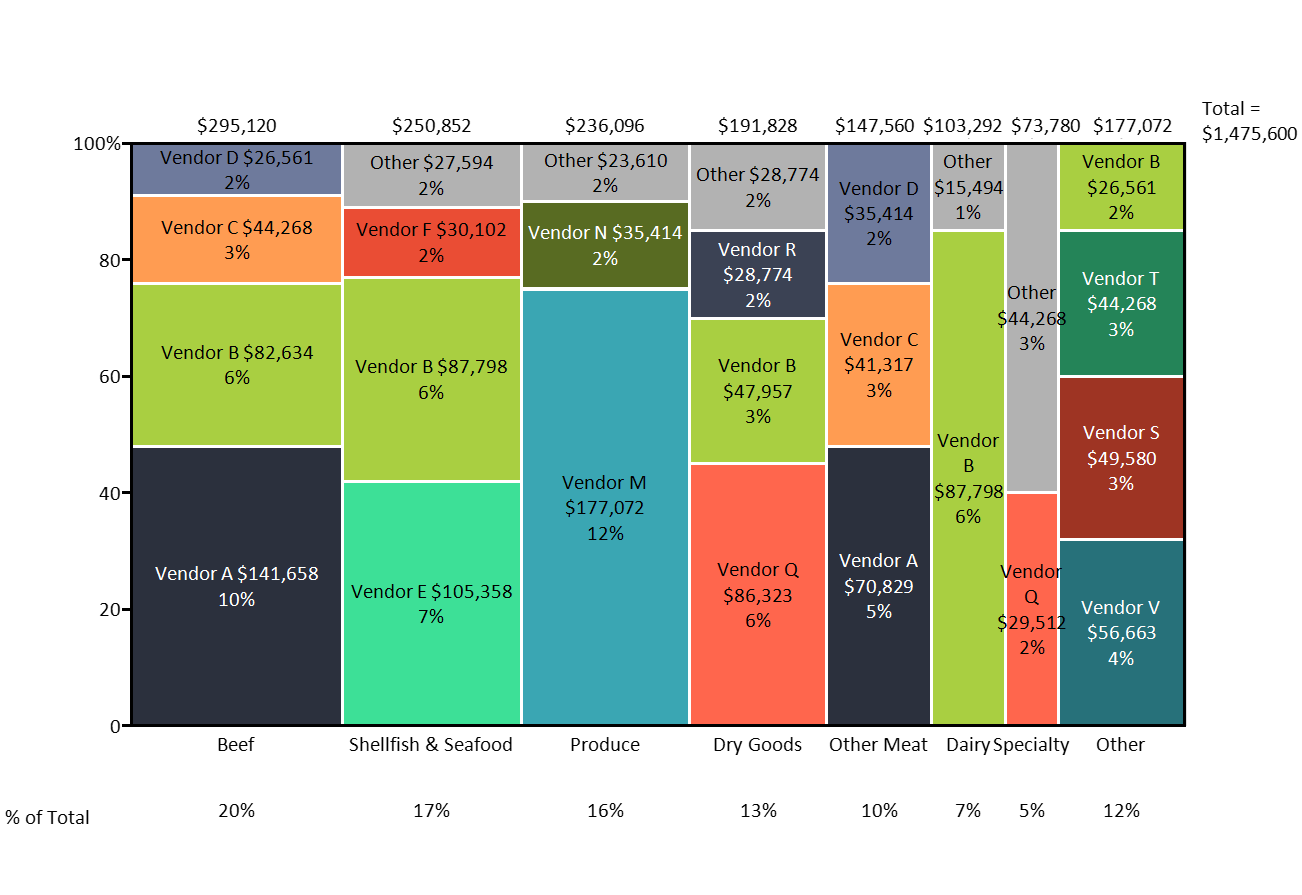
Mekko Graphics has offered Mac support for PowerPoint for years, making it one of the earliest Think-cell alternatives with genuine Mac parity.
Mac-Specific Details:
- PowerPoint add-in works on Mac Office 365, 2019, 2021, 2024
- Supports macOS Sequoia (latest version)
- Important limitation: No Excel add-in for Mac—only PowerPoint
Chart Types:
- Marimekko (Mekko) charts
- Waterfall charts
- Stacked bar and column variations
- Bar/column with breakouts
Pricing: $499/year (more expensive than Think-cell)
Our Testing Results:
- Chart quality matches Think-cell
- Interface feels dated compared to modern alternatives
- Excel linking requires workarounds on Mac (no native Excel add-in)
- Subscription includes both Mac and Windows installations
Limitations:
- More expensive than Think-cell ($499 vs $299)
- No Excel add-in for Mac—significant gap for data-driven workflows
- Smaller user base means less community support
- Interface hasn't been modernized
Verdict: Mekko Graphics works on Mac, but the lack of an Excel add-in creates friction for consultants who link charts to live data. At $499/year, it's hard to justify over Think-cell or Deckary.
3. Zebra BI#
Best for: Power BI users who need IBCS-compliant charts on Mac
Website: zebrabi.com
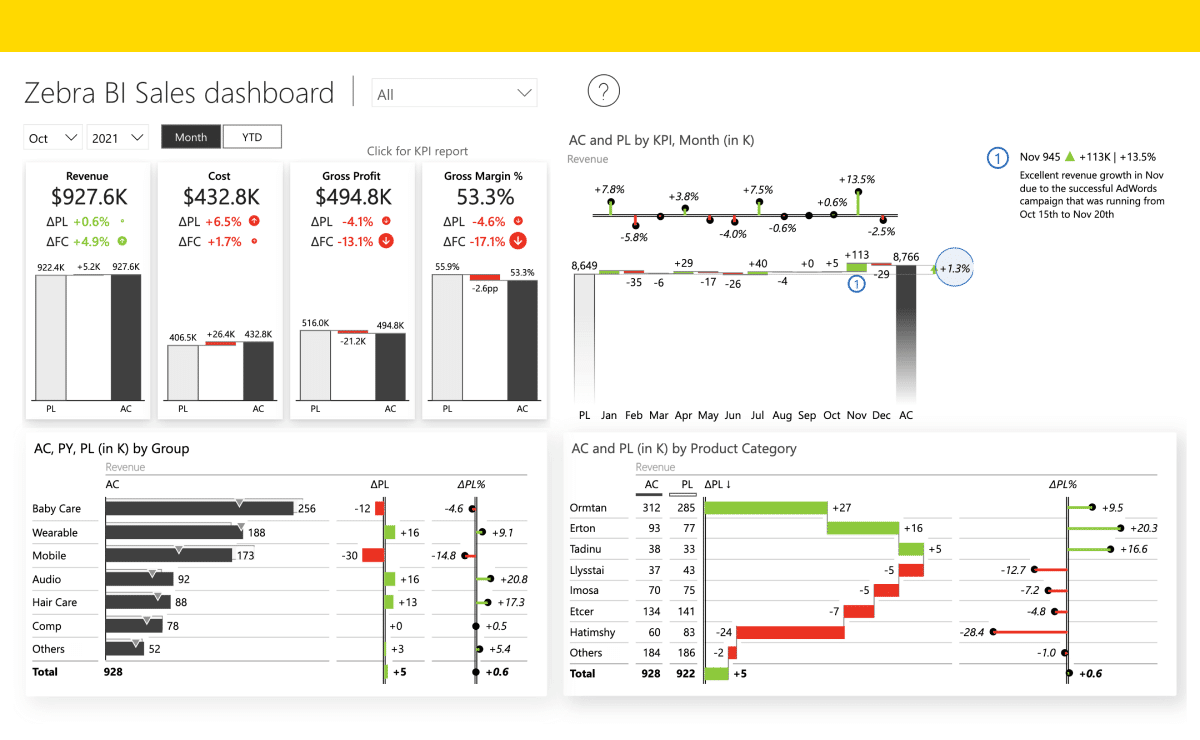
Zebra BI focuses on standardized business charts following IBCS guidelines (International Business Communication Standards). It works as both an Excel and PowerPoint add-in.
Mac Support:
- Fully supports Office for Mac
- Works with Office 2016 or later on Mac
- Available through Microsoft AppSource
- Works in desktop and online environments
Chart Types:
- Waterfall charts (IBCS-styled)
- Variance charts
- Small multiples
- Integrated financial reporting visuals
Pricing: Starts at $28/month per user (Pro), higher tiers for Business and Enterprise
Our Testing Results:
- Excellent for standardized financial reporting
- Strong Power BI integration for users in that ecosystem
- PowerPoint charts are less flexible than Think-cell or Deckary
- Learning curve for IBCS conventions
Limitations:
- Different workflow than Think-cell—more about reporting than one-off presentations
- PowerPoint integration is secondary to Power BI
- IBCS styling may not match consulting firm brand guidelines
- Monthly pricing adds up ($336/year vs Deckary's $119)
Verdict: If you're already using Power BI and need Mac-compatible charts, Zebra BI integrates well. For pure PowerPoint workflows, it adds friction compared to native add-ins.
4. Native PowerPoint#
Best for: Occasional charts with zero budget
Included with: Microsoft 365
Since Office 2016, PowerPoint has included native waterfall charts. They work identically on Mac and Windows.
How to Create:
- Insert > Chart > Waterfall
- Enter data in the spreadsheet that appears
- Right-click bars to set as "Total" where needed
Mac Advantages:
- No add-in compatibility issues
- No extra software to install
- Works offline without licensing concerns
Limitations:
- No stacked waterfall charts
- No Mekko charts
- Cannot link to Excel data (charts don't auto-update)
- Setting "Total" bars requires multiple clicks per bar
- Connector lines break when data changes
- No CAGR lines or delta indicators
Our Testing Results:
- Basic waterfall chart: 12-15 minutes (vs 30-45 seconds with add-ins)
- Data update: Requires manual re-entry
- Formatting consistency: Difficult to maintain across slides
When to Use:
- One-off charts that won't need updates
- Simple presentations without complex data
- When budget is genuinely zero
Verdict: Native PowerPoint waterfall charts exist but lack the automation that makes add-ins worthwhile. The time spent fighting with connectors and manual formatting quickly exceeds the cost of a Deckary subscription.
5. Power-user#
Best for: Windows users only (no Mac support)
Website: powerusersoftwares.com
We include Power-user because it frequently appears in Think-cell alternative comparisons—but with an important caveat.
Mac Support Status: Power-user is not compatible with Mac OS. They plan to release a Mac version "eventually, but not in the very near future."
The only workaround is running Windows through Parallels or Boot Camp—defeating the purpose of using a Mac.
If You're on Windows:
- 110+ chart types
- 8,000 vector icons
- 350 editable maps
- AI-powered text tools
- $105/year
Verdict: Excellent Windows tool, but not an option for native Mac users. If you're reading this guide looking for Mac alternatives, Power-user isn't one.
Continue reading: Bullet Charts in PowerPoint · Duplicate Shortcut in PowerPoint · Deloitte Presentation Template
Build consulting slides in seconds
Describe what you need. AI generates structured, polished slides — charts and visuals included.
Feature Comparison Table#
| Feature | Deckary | Think-cell | Mekko Graphics | Zebra BI | Native PPT |
|---|---|---|---|---|---|
| Mac Support | Full | Full | Partial | Full | Full |
| Mac Excel Add-in | Yes | Yes | No | Yes | N/A |
| Apple Silicon Native | Yes | Yes* | Yes | Yes | Yes |
| Waterfall Charts | Yes | Yes | Yes | Yes | Basic |
| Mekko Charts | Yes | Yes | Yes | No | No |
| Gantt Charts | Yes | Yes | No | No | No |
| Excel Data Linking | Yes | Yes | Windows only | Yes | No |
| Stacked Waterfalls | Yes | Yes | Yes | Yes | No |
| CAGR Lines | Yes | Yes | Yes | No | No |
| Price/Year | $49-119 | $299-327 | $499 | $336+ | Included |
| Lifetime Option | $199 | No | No | No | N/A |
*Think-cell requires Office running in native mode, not Rosetta
Which Alternative Is Right for You?#
Choose Deckary If:#
- You use a Mac as your primary machine
- You need waterfall and Mekko charts but not daily
- You want Excel-linked charts that work reliably on Mac
- Budget matters ($49-119/year vs $300+)
- You also want productivity features (shortcuts, icons)
- You switch between Mac and Windows regularly
Choose Native PowerPoint If:#
- You build waterfall charts once or twice a year
- You have zero budget for add-ins
- Charts don't need to link to live data
- You have patience for manual formatting
Stay with Think-cell If:#
- Your firm already has enterprise licenses
- You build complex charts daily (not weekly)
- You need Think-cell's 40+ chart types
- Automatic agenda slides are essential
- IT support is available for troubleshooting
Choose Zebra BI If:#
- You're already in the Power BI ecosystem
- You need IBCS-compliant reporting
- Standardized financial charts are your primary use case
Avoid Mekko Graphics Unless:#
- You're already locked into their ecosystem
- You only need PowerPoint charts (not Excel linking on Mac)
- Budget isn't a concern ($499 > Think-cell's $299)
Making the Transition#
If you're switching from Think-cell to an alternative, here's what to expect:
Chart Migration:
- Existing Think-cell charts remain in your presentations as standard PowerPoint objects
- They won't be editable with the new tool—you'll need to rebuild them
- Think-cell 14 can convert Mekko Graphics charts to Think-cell, but not vice versa
Learning Curve:
- Deckary: 30 minutes to basic proficiency, similar concepts to Think-cell
- Native PowerPoint: No learning curve, but significant time investment per chart
- Zebra BI: Steeper curve due to IBCS conventions and different workflow
Team Coordination:
- If colleagues use Think-cell, ensure file compatibility
- Charts created with alternatives display correctly for Think-cell users
- They just can't edit them without your tool
The Mac User's Bottom Line#
Think-cell is excellent software. It defined the category and remains the standard at top consulting firms. But "designed for Windows, ported to Mac" creates friction that native Mac tools avoid.
For Mac users who need professional charts:
-
If price matters: Deckary delivers waterfall, Mekko, and Gantt charts with full Mac parity at $49-119/year. That's roughly what Think-cell costs for two months.
-
If you're already invested: Staying with Think-cell makes sense if your firm has licenses and IT support. The Mac version works—it just requires more troubleshooting than the Windows version.
-
If charts are occasional: Native PowerPoint waterfall charts work for simple, one-off needs. The 12 minutes you spend manually formatting still costs less than any subscription.
The best tool is the one that works when you need it. At 2 AM before a client presentation, "works reliably on Mac" matters more than feature count.
Try Before You Decide#
Most tools offer free trials:
- Deckary — 14-day free trial, no credit card required
- Think-cell — 30-day free trial
- Mekko Graphics — Free trial available
- Zebra BI — 14-day free trial
Build a real presentation with each tool on your Mac. The experience will tell you more than any comparison article.
Build consulting slides in seconds
Describe what you need. AI generates structured, polished slides — charts and visuals included.
Try Free