Mekko chart
A Mekko chart (or Marimekko chart) uses variable-width columns to show two data dimensions at once—typically market size and market share. Also called a market map or mosaic chart.
- Company A
- Company B
- Company C
- Others
What is a Mekko chart?
A Mekko chart (also called a Marimekko chart or mosaic plot) is a two-dimensional variation of a stacked bar chart where both the height AND width of columns represent data values.
The defining feature is variable-width columns:
- Column width represents one dimension (typically total market size or revenue)
- Column height segments represent another dimension (typically market share or composition)
This dual-encoding makes Mekko charts exceptionally powerful for competitive and market analysis in consulting, strategy, and finance. When a partner asks for a market map showing both segment size and competitive share in one view, a Mekko chart is usually the answer.
Also known as
- Marimekko chartNamed after Finnish textile company's patterns
- Market mapCommonly used to map market landscapes
- Mosaic chartResembles a mosaic of rectangular tiles
- Variable-width chartColumns vary in width by data values
Mekko vs. standard stacked bar
In a standard stacked bar chart, all columns have equal width—you can only show one dimension (composition). In a Mekko chart, column width varies by data, letting you show both size AND composition at once. This is why consultants use Mekko charts for market sizing: the enterprise segment being 3x wider than SMB immediately shows its relative importance.
When to use Mekko charts
Mekko charts excel in four key scenarios
Market sizing & share
- Market size ($B) by segment
- Competitor market share by region
- Revenue by product category
Share of wallet analysis
- Customer spending by category
- Wallet share by vendor
- Budget allocation analysis
Competitive landscape
- Market position by geography
- Segment attractiveness vs share
- Competitive intensity mapping
Portfolio analysis
- Revenue by BU and customer type
- Investment by sector and stage
- Sales by channel and product
When not to use Mekko charts
- Only one dimension mattersUse standard bar or stacked bar instead
- Showing change over timeUse line chart or waterfall instead
- Comparing a few discrete categoriesUse grouped bar chart instead
- Audience unfamiliar with formatUse simpler visualization
If the variable width doesn't add meaningful insight, you're adding complexity without value.
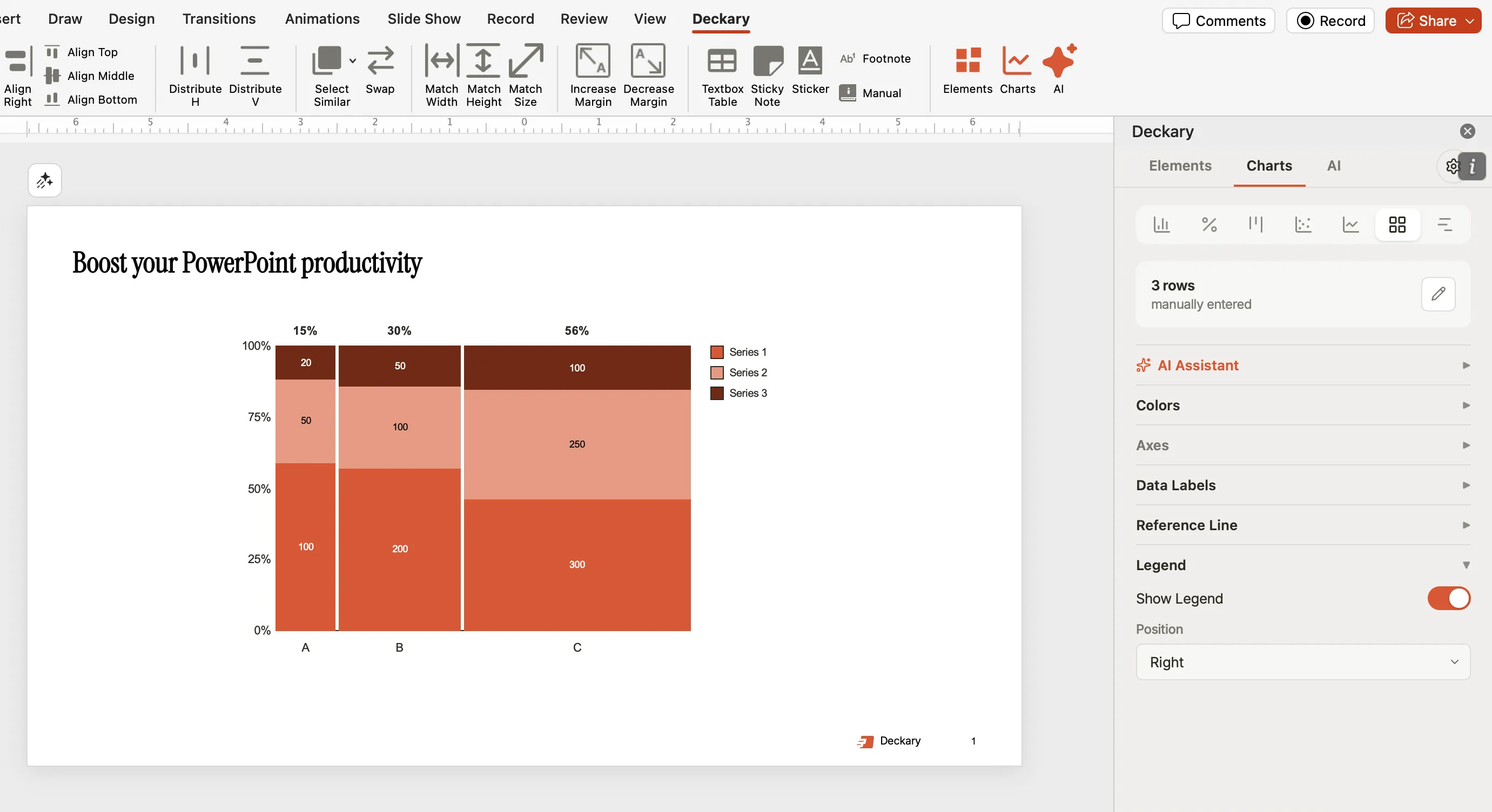
Mekko chart example
A market sizing chart showing segment size and competitive shares
How to create a Mekko chart
Unlike waterfall charts, native PowerPoint and Excel cannot create true Mekko charts because they lack variable-width columns. Here are your options:
Excel workaround
PowerPoint add-ins
With Deckary
BI tools
Create professional Mekko charts
Skip the 90-minute Excel workarounds. Deckary creates consulting-grade Mekko charts in seconds with automatic formatting and Excel linking—at a lower price than Mekko Graphics.
Mekko chart FAQ
Common questions about Mekko and Marimekko charts
Complete guide
Related articles
Related features
Compare alternatives